
Ever asked an AI tool for help and gotten back something that completely missed the point? That’s usually not the AI letting you down, it’s one of a handful of AI prompting mistakes sneaking into how you’re asking. I’ve made every single one of these myself, more than once, before I figured out what was actually going wrong. This guide walks through the eight mistakes that trip up most people, with a plain example of what not to write and what to write instead, so you can start getting answers that actually match what you need.
What Even Counts As AI Prompting Mistake?
A prompt is just the instruction you type into an AI tool, so a prompting mistake is any way of writing that instruction that leaves the AI guessing about what you actually want. And AI models are not mind readers, they just work with whatever words you hand them.
Think of it like giving directions to a cab driver. If you say “take me somewhere nice,” you might end up at a fancy restaurant when you actually wanted a quiet park. Say “take me to the Italian place on Fifth Street,” and the driver knows exactly where to go. Prompts work the same way: the clearer the directions, the less chance of ending up somewhere you didn’t mean to go.
Why These AI prompting mistakes Cost You So Much Time
Here’s the part that’s easy to miss: a vague or messy prompt rarely fails all at once. It just quietly costs you a retry, then another retry, then a rewrite of the AI’s answer to fix what it got wrong. Multiply that across a full day of using AI for work, and those small mistakes add up to a real chunk of wasted time.
The good news is that once you can spot these AI prompting mistakes in your own prompts, fixing them takes seconds, not a course in prompt engineering. So let’s get into the eight that show up most often.
The 8 AI Prompting Mistakes You’re Probably Making
1. Being Too Vague
The mistake: Typing a broad request and hoping the AI fills in the blanks the way you imagined.
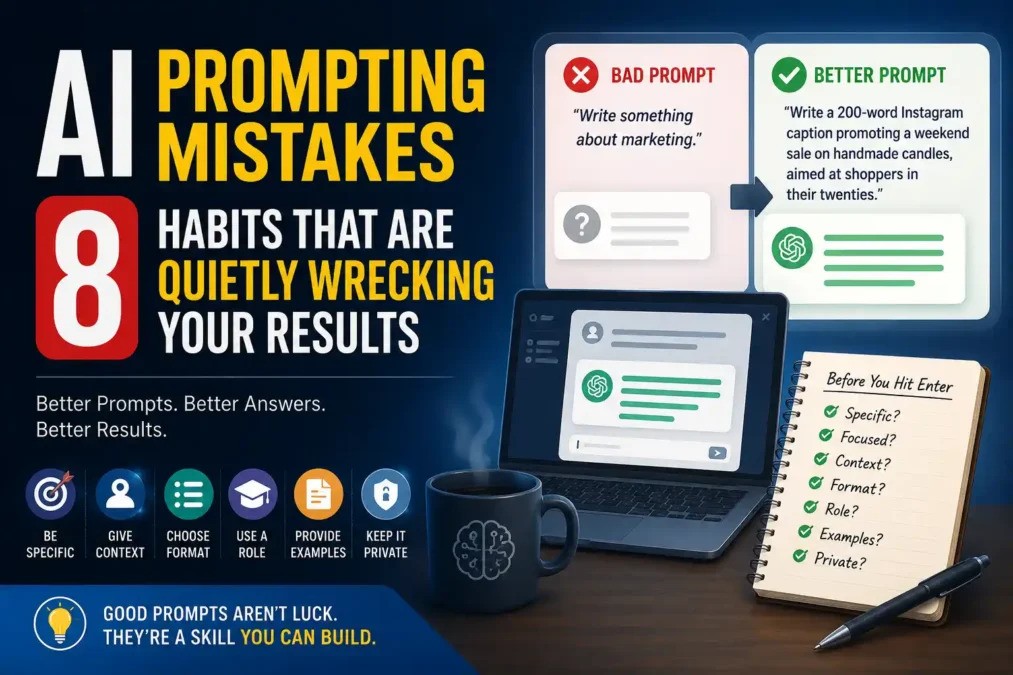
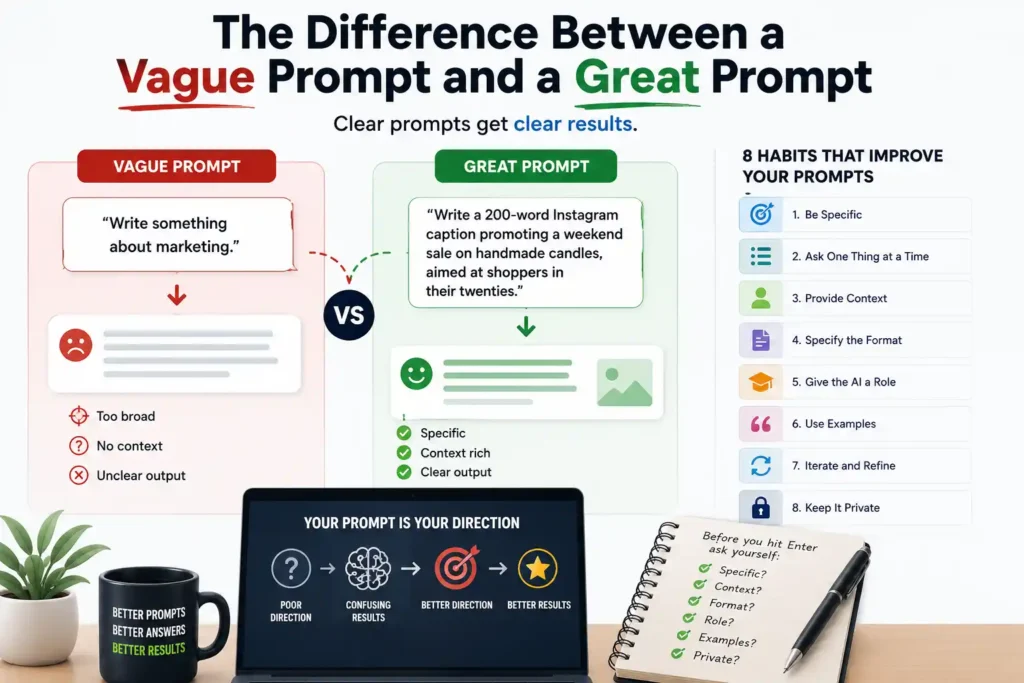
- Bad prompt: “Write something about marketing.”
- Better prompt: “Write a 200-word Instagram caption promoting a weekend sale on handmade candles, aimed at shoppers in their twenties.”
Why it fails: without a topic, audience, length, or angle, the AI has to guess at all four, and it usually guesses wrong. The fix costs you nothing extra, it just means answering the questions in your head before you hit enter: what, for who, and how long.
2. Stuffing Too Many Asks Into One Prompt
The mistake: Cramming five different questions into a single message and expecting five solid answers back.
- Bad prompt: “Write a business plan covering the market, the budget, hiring, and a marketing strategy, and also suggest a name for my company.”
- Better approach: ask for one piece at a time. Start with “Outline the key sections a business plan needs for a small bakery,” then move on to budget once that’s settled.
It’s a lot like cooking five different dishes in the same pan at the same time. You can try it, but don’t be surprised when everything comes out half-done. Give the AI one dish to focus on, and it does a much better job. This is one of the more costly AI prompting mistakes, since it multiplies across every follow-up question you ask afterward.
3. Skipping The Context The AI Actually Needs
The mistake: Assuming the AI remembers your situation, your business, or what you meant three messages ago.
- Bad prompt: “What should I do next?”
- Better prompt: “I’m a freelance designer wrapping up a logo project for a client. What should I send them next to make the handoff feel professional?”
I find myself making this mistake constantly when I’m mid-conversation and forget the AI can’t actually see what’s in my head. Add the background you’d give a new coworker on their first day, and the answer gets sharper right away.
4. Never Saying What Format You Want
The mistake: Leaving the shape of the answer up to chance, so you get a wall of text when you wanted a short list.
- Bad prompt: “Give me ideas for my presentation.”
- Better prompt: “Give me 5 slide title ideas for a 10-minute presentation, as a numbered list.”
Without a format instruction, the AI picks whatever it defaults to, and that’s often not what you had in mind. A single line like “as a table” or “in three bullet points” fixes this instantly. It’s one of the smaller AI prompting mistakes on this list, but it’s a quick win every time.
5. Forgetting To Give The AI A Role
The mistake: Asking for feedback or advice without telling the AI whose perspective to answer from.
- Bad prompt: “Review my resume.”
- Better prompt: “You’re a hiring manager for marketing roles with 10 years of experience. Review my resume and point out the three biggest gaps.”
A role tells the AI which knowledge to lean on and which tone to use, so the feedback goes from generic to genuinely useful. It costs you one extra sentence, and it usually changes the whole answer. If you want to see how far this technique goes, Anthropic’s own prompt engineering documentation covers role prompting in more depth, with examples built for Claude specifically.
6. Not Showing Any Examples Of The Style You Want
The mistake: Describing a tone in words instead of just showing it.
- Bad prompt: “Write this in my brand voice.”
- Better prompt: paste two or three short examples of things you’ve already written, then ask the AI to match that pattern.
This one works a lot like teaching a newborn baby to recognize a face. You don’t explain what a face looks like in words, you just show them faces over and over until they get it. AI learns from examples the same way, so showing beats describing almost every time. OpenAI’s official prompting guide calls this the same thing, and it’s one of the highest-impact fixes on this entire list.
7. Treating The First Answer As The Final Answer
The mistake: Taking whatever the AI hands you on the first try and running with it, even when something feels off.
- Bad approach: copy-pasting the first draft straight into an email or document.
- Better approach: read it, tell the AI exactly what’s missing or wrong, and ask for a revised version. Two or three quick rounds almost always beats the first attempt.
The first response is a starting point, not a finished product, so treat it that way. A quick “make this shorter” or “add a specific example here” usually gets you the rest of the way.
8. Typing In Details You Wouldn’t Want Public
The mistake: Pasting real client names, financial numbers, or private information into a prompt without thinking twice.
- Bad prompt: “Analyze this customer list [real names, emails, and purchase history] and suggest a marketing plan.”
- Better prompt: swap in placeholder names and rounded numbers, or describe the situation hypothetically instead.
A good rule I’ve picked up: don’t type anything into a public AI tool that you wouldn’t feel fine seeing on a billboard.
A Quick Checklist for avoiding AI prompting mistakes
- Specific: Does the prompt name a clear topic, audience, and length?
- Focused: Is this one request, not five stacked together?
- Grounded in context: Would a new coworker understand my situation from this alone?
- Formatted: Have I said whether I want a list, a table, or plain paragraphs?
- Given a role: Would a specific expert perspective sharpen this answer?
- Backed by examples: If tone matters, have I shown a sample instead of just describing it?
- Private: Have I removed anything I wouldn’t want made public?
Common Questions About AI prompting mistakes
Does being polite to an AI change the answer? Not really. Politeness itself doesn’t improve output quality, but people who write polite prompts also tend to write clearer, more specific ones, so the two often go together.
How long should a good prompt be? As long as it needs to be and no longer. A one-line prompt is fine for a simple question, but a longer task usually needs a few sentences of context, format, and constraints. The length isn’t the problem, padding it with irrelevant details is.
Do these mistakes matter more with certain AI tools? Not really. These AI prompting mistakes show up the same way across ChatGPT, Claude, Gemini, and every other major model, since they’re really about being specific, giving context, and naming a format. Some tools respond slightly differently to role instructions or examples, but the fundamentals stay the same everywhere.
What’s the fastest way to get better at this? Pick one real prompt you wrote recently that didn’t work, and rewrite it using the checklist above. Compare the two answers side by side. Doing that a few times teaches you more than reading ten more articles like this one.
Where To Learn More: Official Prompting Guides
The core habits in this guide will fix most AI prompting mistakes on their own, but if you want to go deeper on any single AI tool, the companies that build these models publish their own free guides. Here are the ones worth bookmarking:
- For Claude: Anthropic’s prompt engineering documentation walks through clarity, examples, role prompting, and chain-of-thought reasoning with Claude-specific examples.
- For ChatGPT: OpenAI’s official prompting guide covers the same fundamentals from GPT’s side, including how system messages and structured instructions change the output.
- For Gemini: Google’s prompt design strategies page is the closest thing to an official style guide for writing prompts Gemini responds well to.
- For a model-agnostic deep dive: Learn Prompting is a free, open-source course that covers everything from the basics up through advanced techniques, and it works no matter which AI tool you’re using.
None of these replace the habits above, they just give you a place to go once you’ve got the fundamentals down and want to get more out of a specific tool.
Conclusion
Most disappointing AI answers trace back to one of these eight AI prompting mistakes, not to the AI itself falling short. Once you can spot a vague prompt, a missing role, or a stuffed-full request in your own writing, fixing it becomes second nature. Start small: pick the one mistake from this list that sounded the most familiar, and fix just that one thing on your very next prompt.
 TechPro Master