

Ever pasted the same prompt into ChatGPT, Gemini, and Claude AI and gotten three answers that felt like they came from three different people? You’re not imagining it. Each tool has its own habits, so a prompt that shines in one can fall flat in another. In this guide I’ll show you how Claude AI, ChatGPT, and Gemini read your instructions differently, and I’ll give you prompts you can copy and test on your own.
Why Does the Same Prompt Give Different Results?
A prompt is just the instruction you type to tell an AI what you want. But every model was trained and fine-tuned differently, so each one has its own instincts about how to read that instruction. Think of three coworkers: one wants a checklist, one wants the backstory, and one wants links. Hand all three the same sticky note and you’ll get three different results.
The top-ranking guides (Geekflare, Prompt Builder, PromptZone, and Search Engine Journal) all show the same pattern. Claude AI rewards context and reasoning, ChatGPT rewards structure and clear formats, and Gemini rewards scope and sources. Geekflare notes the tendencies have held up through constant model updates. So learn the habits, not the version numbers. Once you know what Claude AI expects, the rest gets easier.
The takeaway: write one solid base prompt first, then adjust the style for Claude AI, ChatGPT, or Gemini.
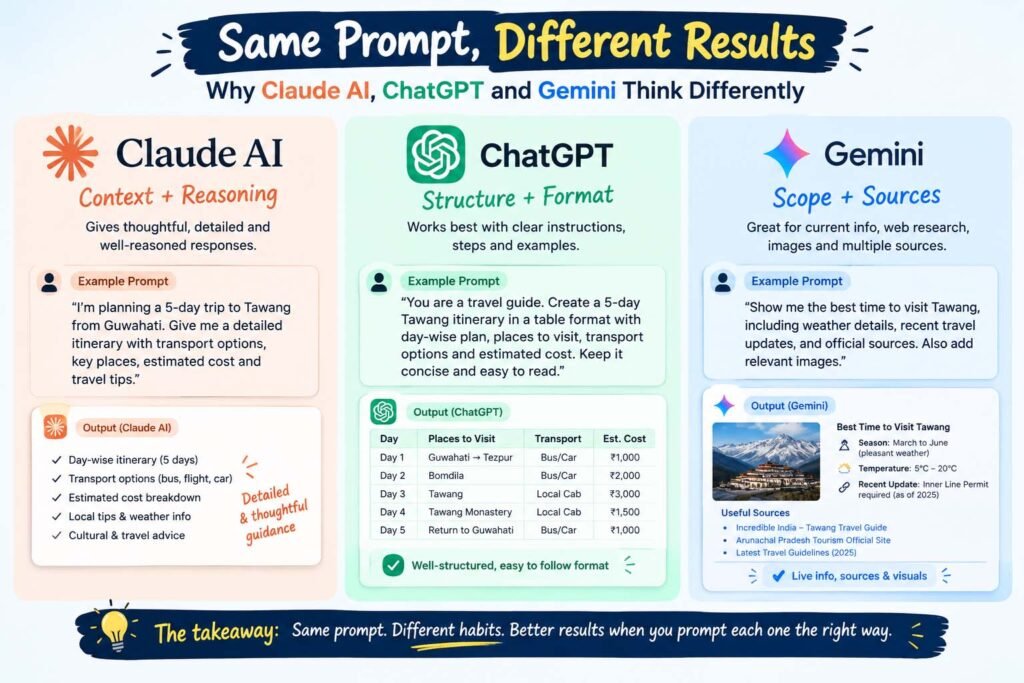
Quick Comparison: Claude AI vs ChatGPT vs Gemini
Here’s the cheat sheet I’d keep open in a second tab, and it shows where Claude AI differs most from the other two.
| ChatGPT | Claude AI | Gemini | |
|---|---|---|---|
| Prompt style that works | Format first, short steps, one example | Goal, reasons, and background up front | Scope, time range, and a request for sources |
| Best at | Structured output, templates, everyday answers | Human-sounding writing, careful reasoning, long documents | Current web research, images plus text, huge context |
| Common failure | Clean format even when the content is shaky | Long answers unless you set a limit | Invented details or thin sources unless you ask |
| Paid plan (late 2025 prices) | ChatGPT Plus, about $20 a month | Claude Pro, about $20 a month | Google AI Pro, about $19.99 a month |
All three have a free tier too, so you can test everything in this guide with ChatGPT free, Claude AI free, and the free version of Gemini AI. Prices change, so check each site before you subscribe.
How Do You Prompt ChatGPT?
ChatGPT (people also search it as chat gpt or gpt chat) works best when you’re blunt and specific. State the format first, number the steps, and add a short example if tone matters. Role framing, like “You are a technical writer,” still works well here. Compared with Claude AI, ChatGPT likes orders, not backstory: the clearer your order, the faster the right tray comes back.
Here’s a Bad Example / Better Example pair (our guide to prompt engineering with ChatGPT goes deeper):
- Bad Example: “Write about email marketing.”
- Better Example: “You are a B2B email marketer. Write a 150-word intro about email marketing for SaaS founders. Use a friendly tone, end with one question, and avoid buzzwords.”
The better version sets a role, a length, an audience, and a rule. Whether you’re in the ChatGPT app or on the website, that structure is what the model latches onto. One more thing worth knowing: Prompt Builder points out that ChatGPT can hand you a clean-looking format even when the content underneath is weak, so always read the answer, not just the layout.
The takeaway: with ChatGPT, tell it the shape of the answer before the topic.
How Do You Prompt Claude AI?
Claude AI, made by Anthropic, tends to do its best work when it understands why you’re asking. PromptZone describes it as leaning careful, which fits what the other guides say about context and explained reasoning. Think of Claude AI like a new teammate who does great work once they know what the meeting is actually about. Give Claude AI the background, and Claude AI gives you better judgment back. And Claude AI will push back a little if your request is vague or risky, which I’d suggest treating as a feature.
Here’s another pair:
- Bad Example: “Summarize this report.”
- Better Example: “I’m presenting this report to a nervous client tomorrow. Summarize it in five bullets, list two risks I should be ready to explain, and keep it under 200 words.”
Notice the better version tells Claude AI the situation, the output, and the limit. That last part matters, because Prompt Builder warns that Claude AI can run long unless you cap the length. A good Claude AI prompt follows this order:
- Start with the goal in one sentence.
- Add the key facts as a short list.
- Ask for assumptions or unknowns.
- Ask for a recommendation with trade-offs.
- Set a maximum length.
If you’re just starting, the free plan of Claude AI is enough to try all of this, and Claude Pro raises your usage limits when you start leaning on it daily. You can use it in the browser, the Claude app, or the Claude desktop app. If you want a full beginner walkthrough, start with our guides on how to use Claude AI and prompt engineering with Claude.
The takeaway: with Claude AI, explain the situation, then ask for the result. That one habit fixes most weak Claude AI answers.
How Do You Prompt Gemini?
Gemini, also called Google Gemini or Gemini AI, shines when the job feels like research. Geekflare’s tests found it the strongest of the three on web-grounded questions, because it pulls in current sources. The trick is to be specific about scope: the question, the time range, the region, and what counts as a good source. Unlike Claude AI, Gemini wants boundaries, a bit like asking a librarian for help: “books” gets you a shrug, but “three recent sources on this topic, with links” gets you a stack.
Here’s the pair for Gemini:
- Bad Example: “What’s happening with AI rules in Europe?”
- Better Example: “List the three biggest EU AI regulation updates from the last 90 days. For each one, tell me what happened, who it affects, and give a source link. If you’re unsure about something, say so.”
There’s a catch, though. In Geekflare’s writing test, Gemini added product details nobody asked for, so give it the facts you want used and tell it not to invent anything. Gemini Pro handles the heavier tasks, while Gemini Flash is the faster, lighter option. We cover this in detail in our Gemini prompts for research and summaries templates and our six-step guide on how to use Gemini for research. Prompt Builder also notes that newer Gemini 3 Pro models follow short instructions better, so a lot of old, wordy prompts can be trimmed down.
The takeaway: with Gemini, set the boundaries and ask for sources, which is the opposite of the Claude AI approach.
What Happens When One Prompt Hits All Three Tools?
Geekflare ran five rounds of the same prompts through ChatGPT, Claude AI, and Gemini, and the results line up nicely with the habits above:
- Writing: Claude AI produced the most polished customer-facing copy, ChatGPT followed the brief most closely, and Gemini added extra details that weren’t in the prompt.
- Debugging: All three found a simple typo in a Python function. ChatGPT gave the most beginner-friendly explanation, and Claude AI gave the most precise one.
- Research: Gemini won, thanks to its live web sources.
- Voice matching: Claude AI came closest to copying a writer’s style.
- Complex reasoning: No clear winner. ChatGPT would cut one product line, while Claude AI and Gemini would cut a different one, though all three agreed on where to invest.
Search Engine Journal ran its own tests and landed in a similar place: ChatGPT for everyday answers and shopping, Gemini for deep research, and Claude AI for writing and coding. They also caught a good warning. When asked for a robots.txt file, Gemini’s version would have blocked every crawler by default, which wasn’t what the prompt asked for. Always check the output before you paste it into anything real.
Tom’s Guide ran a separate Gemini vs Claude AI test with seven prompts and also favored Claude AI for clarity and vivid, detailed writing. So there’s no single winner, and that’s the point. The best tool depends on the task, and the best prompt, whether for Claude AI, ChatGPT, or Gemini, depends on the tool.
Three Claude AI Prompts You Can Copy Today
Claude AI keeps showing up in rising searches, so here are three starter prompts. Each one follows the context-first habit, so paste them in and swap the brackets for your own details:
- Editing helper: “I’m writing for beginners. Rewrite the draft below in a warm, plain tone, keep it under 120 words, and tell me what you changed.” Claude AI is strong at matching tone, so this plays to its strengths.
- Decision helper: “I’m choosing between [option A] and [option B] for [goal]. List your assumptions, compare the trade-offs, and recommend one.” Claude AI tends to explain its reasoning, which is the whole point here.
- Learning helper: “Explain [topic] like I’m new to it, then quiz me with three questions.” Claude AI handles the back-and-forth well, so keep the same chat going.
Try each one in Claude AI first, then paste the same text into ChatGPT and Gemini.
Is Claude AI or ChatGPT Better for Coding Prompts?
Code is where structure matters most. Prompt Builder suggests ChatGPT for consistent formatting and snippets, and Claude AI for long specs or plan reviews. Claude AI is also the one SEJ calls best for writing and coding, so it’s worth a test. If you work in a terminal, Claude Code is Anthropic’s coding assistant that works inside your project folder, and Claude skills let you save instructions you repeat often so you don’t retype them.
If you’re building an app, test your prompts again after you switch from Claude AI to another model, or the other way around. PromptZone warns that people sometimes spend weeks perfecting a prompt for one model, then plug it into the Claude API or the Gemini API and wonder why the output feels off. It’s not broken. A different model is just reading the same words differently.
One Prompt Template for Claude AI, ChatGPT, and Gemini
You don’t need three separate prompt libraries. You need one base prompt and a short note for each tool, and our guide to advanced prompting techniques in AI shows how to take it further. Here’s a template I’d suggest starting with:
Goal: [what you want, in one sentence]

Context:
- [fact 1]
- [fact 2]
- [who this is for]

Task:
1) [first step]
2) [second step]

Format: [bullets, table, 200 words max]

Rules: [things to avoid, tone, what to do if unsure]
Then follow these steps in order:
- Run the base prompt in Claude AI, ChatGPT, and Gemini.
- Compare the answers for accuracy, format, and how much you had to fix.
- Add a one-line model note: “use strict headings” for ChatGPT, “here’s why I’m asking” for Claude AI, or “cite your sources” for Gemini.
- Run it again and save the winner.
Common Claude AI, ChatGPT, and Gemini Prompt Mistakes
- Copy-pasting one prompt everywhere: A prompt tuned for one tool won’t transfer perfectly, so adjust the structure each time.
- Skipping the output format: Never assume the model knows if you want bullets, a table, or paragraphs. Say it.
- Forgetting length limits: Claude AI can ramble and ChatGPT can pad, so give every tool, Claude AI included, a word count.
- Trusting confident answers: Claude AI, ChatGPT, and Gemini can all sound sure and still be wrong, so check facts and code first.
- Restarting instead of refining: If an answer is close, follow up in the same chat instead of rewriting everything.
FAQ: Claude AI, ChatGPT, and Gemini Prompts
Do I need different prompts for Claude AI, ChatGPT, and Gemini? Not always. A strong base prompt works in all three, and the main change is structure: more context for Claude AI, strict formats for ChatGPT, and scope plus sources for Gemini.
Which one is best for beginners? PromptZone says ChatGPT forgives casual, messy prompts the most, while Claude AI and Gemini reward a bit more precision. That said, the free plan of each is a great place to practice.
Is Claude AI better than ChatGPT for writing? In Geekflare’s tests, Claude AI sounded the most natural and matched voice best, while ChatGPT followed strict instructions more reliably. So it depends on whether you want style or exact compliance.
Can I use the same prompt in Claude AI and Gemini? Yes, as a starting point. Add context for Claude AI, a source request for Gemini, and a format for ChatGPT, and you’re most of the way there.
Is Gemini better for research? If you need current information, yes, since Gemini beat Claude AI and ChatGPT on that round. Just ask for links and double-check them.
What about Perplexity, DeepSeek, Copilot, or Grok? The same habit applies as with Claude AI: test your base prompt, then adjust the structure for each tool.
Conclusion
You started with a simple problem: the same prompt gave you three different answers. Now you know why, and you know what Claude AI, ChatGPT, and Gemini each want. ChatGPT likes a clear format, Claude AI likes context and reasons, and Gemini likes boundaries and sources. Pick one task from your week, run it through Claude AI, ChatGPT, and Gemini with the template above, and see which answer you’d actually use. If Claude AI wins, great, and if it doesn’t, you’ve still learned something about how Claude AI thinks. Start small, and your Claude AI prompts, and every other prompt, will get sharper with every try.