
Ever typed something into ChatGPT and gotten back an answer that was… fine, but not really what you wanted? You’re not alone, and it’s not because you asked a bad question. It’s because ChatGPT can only work with what you give it, and most of us were never taught how to give it enough to work with. That’s the whole idea behind prompt engineering with ChatGPT: learning how to talk to the model so it actually understands the result you’re picturing in your head. I’ll walk you through it step by step, the same way I had to learn it myself, with examples you can copy and use today.
What Is Prompt Engineering With ChatGPT, Really?
Let’s clear up the jargon first. A prompt is just the message you type into ChatGPT, and prompt engineering is the practice of writing that message so it produces the output you actually want, instead of the model’s best guess at what you meant. That’s it. It’s not a coding skill, and it’s not some secret club for developers. It’s closer to learning how to ask a new employee for help: the clearer your instructions, the less back-and-forth you need.
Here’s an analogy that helps: think of ChatGPT like a very capable new hire on their first day. They’re smart, they work fast, but they don’t know your company, your preferences, or what “make it better” means to you. Give them a vague task and you’ll get a vague result. Give them context, an example, and a clear deadline, and you’ll get something close to exactly what you wanted. Prompt engineering with ChatGPT works the same way, and once that clicks, everything else in this guide gets a lot easier to follow.
Why Prompt engineering With ChatGPT Matters for Beginners
You might be thinking: can’t I just ask ChatGPT normally and get a good answer most of the time? Sometimes, sure. But the difference between a so-so prompt and a well-engineered one usually shows up as wasted time, three or four rounds of “no, not like that,” and answers that miss the specific angle you needed.
I’ve noticed that beginners tend to skip prompt engineering entirely and just retype their question with slightly different words when the first answer disappoints them. That works occasionally, but it’s slower and less reliable than learning the handful of habits that make prompt engineering with ChatGPT actually stick. Once you build those habits, you’ll get usable answers on the first or second try instead of the fifth, and that time savings adds up fast if you use ChatGPT daily for work, school, or a side project.
The Core Elements of a Good ChatGPT Prompt
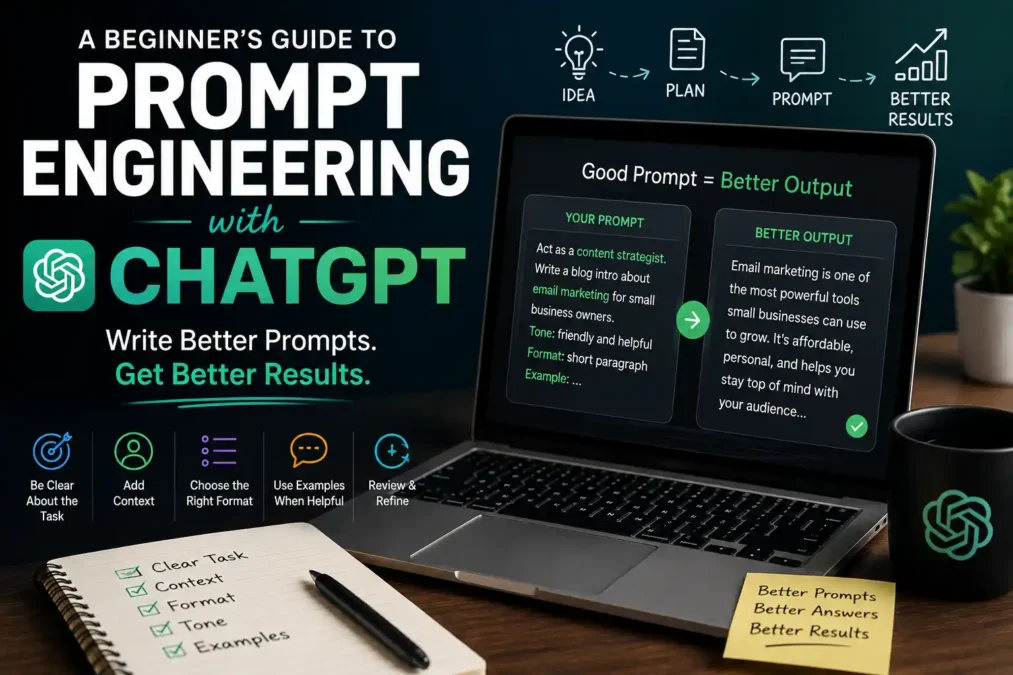
Before we get into the walkthrough, it helps to know what a strong prompt is actually made of. Every solid prompt tends to include some combination of these pieces:
- The task: what you actually want ChatGPT to do, stated as a clear action, like “summarize,” “write,” or “compare.”
- The context: background information the model needs, like your audience, your industry, or the situation you’re in.
- The format: how you want the answer structured, whether that’s a bulleted list, a table, an email, or a short paragraph.
- The tone: the voice you want, such as formal, casual, persuasive, or technical.
- An example (when useful): a sample of the kind of output you’re looking for, so the model has something concrete to match.
You won’t need all five in every prompt. But when a prompt engineering with ChatGPT attempt falls flat, it’s almost always because one of these pieces was missing and the model had to guess at it instead.
A Step-by-Step Walkthrough for Prompt Engineering With ChatGPT
This is the part most guides skip, and it’s the part beginners actually need: a real order to follow instead of just a list of techniques. Here’s how to walk through prompt engineering with ChatGPT from scratch.
Step 1: Start With a Plain Request
Type out what you want in plain language, the same way you’d ask a coworker. Don’t overthink the wording yet, just get the core ask down.
Bad example: “Write about marketing.”
Better example: “Write a short blog intro about email marketing for small business owners.”
The second version already gives ChatGPT a topic, a format, and an audience, and that alone puts you ahead of most first attempts at prompt engineering with ChatGPT.
Step 2: Add Context the Model Can’t Guess
Now think about what background information would change the answer. Who is this for? What do they already know? Why does this matter right now?
Bad example: “Explain investing.”
Better example: “Explain investing to someone in their early 20s who has never opened a brokerage account, using simple terms and no jargon.”
Notice how the second prompt tells ChatGPT exactly who’s reading and what level of explanation they need, so you’re not stuck editing out confusing terms afterward.
Step 3: Specify the Format You Want Back
If you need a table, say table. If you need five bullet points instead of three paragraphs, say that too. ChatGPT will follow format instructions closely once you state them, so this step removes a lot of the reformatting work people do by hand.
Bad example: “Give me some ideas for a workout plan.”
Better example: “Give me a 4-day workout plan as a table, with columns for day, muscle group, and exercises.”
Step 4: Show an Example When the Task Is Specific
This is called few-shot prompting, which just means giving the model one or two examples of the output style you want before asking for more. It’s one of the most useful techniques in prompt engineering with ChatGPT because it removes almost all the guesswork.
Bad example: “Write five product descriptions for my online store.”
Better example: “Write five product descriptions in this style: ‘Cozy Wool Throw – Soft, warm, and made for lazy Sunday mornings.’ Match that tone and length for the next five products: [list].”
Step 5: Review, Then Refine Instead of Restarting
Read the response, then adjust your original prompt rather than typing a brand new one from scratch. Tell ChatGPT what to keep and what to change, since this back-and-forth refinement is a normal, expected part of prompt engineering with ChatGPT, not a sign you did it wrong the first time.
Bad example: Deleting everything and typing a whole new question.
Better example: “This is close, but make the tone more casual and cut it down to three sentences.”
Prompt Engineering Techniques Every Beginner Should Know
Once you’ve got the walkthrough down, these techniques will round out your prompt engineering with ChatGPT toolkit. You don’t need to memorize the technical names, just recognize the pattern behind each one.
- Role prompting: tell ChatGPT to respond as a specific role, like “act as a career coach,” so its tone and priorities shift to match that perspective.
- Few-shot prompting: give one or more examples of the output you want, as covered in Step 4 above.
- Chain-of-thought prompting: ask ChatGPT to “think step by step” before giving a final answer, which tends to improve accuracy on math, logic, or multi-part questions.
- Iterative refinement: treat your first prompt as a draft, and expect to adjust it once or twice based on what comes back.
- Negative instructions: tell ChatGPT what to avoid, such as “don’t use technical jargon” or “avoid mentioning price,” instead of only stating what to include.
Common Mistakes Beginners Make With Prompt Engineering in ChatGPT
I still catch myself doing a couple of these, so don’t feel bad if some sound familiar.
- Being too vague and assuming context ChatGPT can’t see: the model doesn’t know your company, your inside jokes, or what “the usual format” means unless you spell it out.
- Cramming five separate questions into one prompt: this usually gets you a rushed, shallow answer to each part instead of one solid answer.
- Giving up after one bad response: a disappointing answer is a cue to add context or an example, not a sign that ChatGPT can’t help with the task.
- Skipping the format instruction: leaving structure up to chance means you’ll spend extra time reformatting the answer yourself afterward.
- Forgetting the audience: the same question can need a completely different answer depending on who’s going to read it.
A Reusable Prompt Formula You Can Copy
Here’s the shortcut version of everything above, something you can paste into your notes and reuse whenever you sit down with ChatGPT:
“Act as a [role]. I need you to [task] for [audience]. The tone should be [tone], and the format should be [format]. Here’s an example of the style I want: [example, if you have one].”
Fill in the brackets and you’ve got a prompt that already covers task, context, tone, format, and an example, which is the exact foundation this whole approach to prompt engineering with ChatGPT is built on. Keep this formula open in a notes app for the first few weeks, until writing prompts this way starts to feel automatic.
FAQ: Prompt Engineering With ChatGPT for Beginners
Do I need to know how to code to learn prompt engineering with ChatGPT? No. Prompt engineering is a writing and communication skill, not a programming one. If you can write a clear instruction to a coworker, you already have the foundation you need.
How long does it take to get good at this? Most beginners notice a real improvement within their first week of deliberately using context, format, and examples in their prompts. It’s less about time and more about building the habit of including those pieces every time.
Does prompt engineering with ChatGPT work the same way on other AI tools? The core ideas, like giving context, stating a format, and showing examples, carry over to most large language models. Some tools have their own quirks, but the fundamentals you’ll learn here will transfer.
What’s the single biggest improvement a beginner can make? Adding context. Out of everything in this guide, telling ChatGPT who the answer is for and why you need it does more to improve the response than any other single change.
For the official word straight from the source, OpenAI’s own prompt engineering guidance is worth bookmarking, and if you want to go deeper into technique names and research-backed patterns, Prompting Guide is one of the most complete references in the space. For a broader, plain-English overview of how prompt engineering fits into the wider AI landscape, IBM’s explainer is a solid next read too.
Conclusion
Prompt engineering with ChatGPT isn’t about memorizing clever tricks or learning to code. It’s about being specific in the same way you’d be specific with a new coworker: give the task, the context, the format, and an example when it helps, then refine instead of restarting. Run through the five-step walkthrough above a handful of times and it stops feeling like a checklist and starts feeling like how you naturally talk to ChatGPT. Start small: pick one prompt you’d normally type in a rush, and try running it through the formula above instead. You’ll likely notice the difference on the very first try.

 TechPro Master