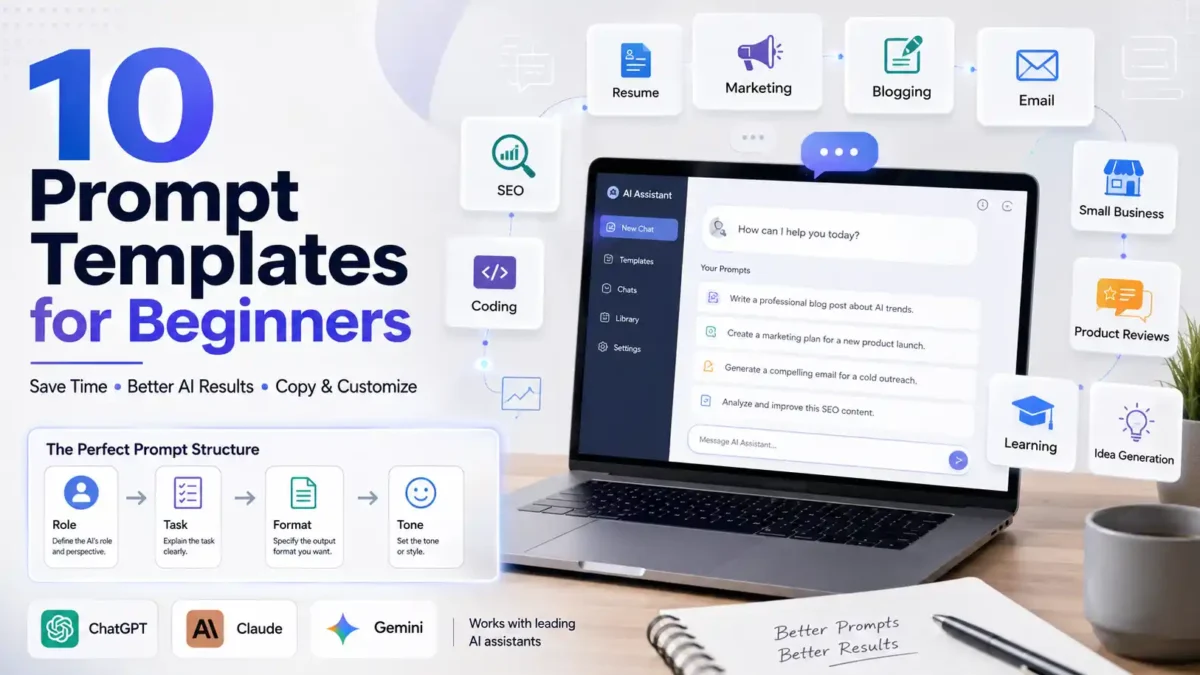

You’ve probably typed something into ChatGPT or Claude, gotten back a vague, generic answer, and thought, maybe AI just isn’t as good as everyone says.
I’ve been there too.
Here’s the thing though: the tool wasn’t the problem. The prompt was.
Most beginners don’t fail because the AI is weak, they fail because they’re asking for things the same way they’d ask a friend for a favor, loosely, with half the details missing. That’s exactly what good prompt templates for beginners fix. A template is a reusable structure you fill in with your own details, so instead of writing a new prompt from scratch every single time, you just swap out a few words and get a solid result in seconds.
In this guide, I’ll walk you through what these templates actually look like, why they save so much time, and I’ll give you fully specified, copy-paste versions for the sectors people ask about most: resumes, marketing, blogging, email, coding, and more. For a deeper technical look at how professional prompt structures are built, Anthropic’s own prompt engineering guide and OpenAI’s prompt engineering documentation are both worth a look alongside this one.
Quick Summary
- A prompt template is a reusable pattern you fill in with your own details instead of writing prompts from scratch
- Templates save time, cut down on back-and-forth, and give you more consistent output
- This guide includes ready-to-use templates for resumes, marketing, content writing, email, SEO, coding, and small business tasks
- You’ll also get a simple four-step process for using any template, common mistakes to avoid, and a few pro tips I’ve picked up along the way
What Is a Prompt Template?
A prompt template is a pre-written structure with blanks in it, blanks you fill in with your specific topic, audience, or goal. Instead of typing a fresh request every time, you keep a small set of proven formats on hand and just swap out the details.
Think of it like a recipe card. You don’t invent a new recipe every time you want pasta, you follow the same basic steps and swap the sauce or the vegetables depending on what you’ve got. A prompt template works the same way: the structure stays the same, only the ingredients change.
Here’s a basic version of one:
Act as a [role]. Your task is to [goal]. Provide the output in [format]. Keep the tone [style].Swap in “career coach,” “write a resume summary,” “bullet points,” and “confident” and you’ve got a working prompt in under ten seconds.
Takeaway: a template turns prompt writing from a blank-page problem into a fill-in-the-blank problem, and that’s exactly why it’s faster.
Why Beginners Should Use Prompt Templates
Writing a good prompt from scratch takes real thought. You have to figure out the role, the goal, the format, the tone, and the constraints, all before you’ve even hit enter. That’s a lot to hold in your head when you’re new to this.
Templates skip that thinking every time you use them, because you’ve already done the thinking once, up front.
The main benefits:
- Saves time: you’re not rebuilding the same structure every session
- Reduces guesswork: you already know which pieces make a prompt work
- Improves output quality: structured prompts give the AI less room to guess what you meant
- Beginner-friendly: no need to learn technical prompt engineering jargon first
- Reusable across tasks: one resume template works for every job application, one marketing template works for every campaign
I’ve noticed that the people who get frustrated with AI tools fastest are usually the ones typing one-line requests like “write me a resume” or “make an ad for my shop.” The AI isn’t wrong to give a generic answer back, it was only given a generic question.
The Core Prompt Template Formula
Nearly every good template, no matter the sector, is built from the same four pieces:
- Role: who should the AI act as (a career coach, an SEO expert, a senior developer)
- Task: what exactly do you want done
- Format: how should the output look (bullet points, a table, a 300-word draft)
- Tone and constraints: style, length limits, or things to avoid
Here’s what happens when a prompt is missing most of these pieces, versus when it has all four.
Bad example: “Write an Instagram caption for my coffee shop.”
Better example: “Act as a social media copywriter for a small-batch coffee roaster. Write 3 Instagram captions promoting our new cold brew launch. Keep each one under 30 words, casual tone, and end with a call to action.”
The second version tells the AI who to be, what to make, how long it should be, and what tone to use, so there’s almost nothing left to guess.
Takeaway: if a template ever falls flat, check it against these four pieces first. Nine times out of ten, one of them is missing.
Prompt Templates for Top Sectors
Below are fully specified templates, organized by the sectors beginners ask about most. Each one follows the Role, Task, Format, Tone formula above, so you can trust the structure even before you fill in your own details.
1. Resume and Cover Letter Templates
Job seekers are one of the biggest groups using AI prompts right now, and for good reason. Tailoring a resume to every single job posting is tedious work, and a good template turns that chore into a five-minute task.
Resume summary template:
Act as an experienced career coach. Write a professional resume summary for a [job title] role with [X years] of experience in [industry/skill]. Highlight my top achievements: [achievement 1], [achievement 2], [achievement 3]. Use only the information I've given you, don't invent skills or numbers. Keep it to 3-4 sentences, confident tone, no clichés like "hardworking" or "team player."Bullet point rewrite template:
Act as a resume writer. Rewrite this job responsibility as a resume bullet point: [paste your responsibility]. Start with a past-tense action verb, include a number or result if one exists, and keep it under 20 words. Don't use "responsible for" or "helped with."Job tailoring template:
Act as a career coach. Here's my resume: [paste resume]. Here's the job description: [paste job description]. Rewrite my resume to highlight the skills and experience that match this specific job. Use only what I've provided, if something important is missing, ask me instead of guessing.👉 Best for: job seekers applying to multiple roles 👉 Why it works: it forces the AI to work only from your real experience instead of inventing achievements, which is exactly what career experts warn against when using AI for resumes
Takeaway: the single biggest resume prompting mistake is letting the AI fill in gaps with fiction, so always add a rule telling it to ask instead of assume.
2. Marketing and Social Media Templates
Marketing prompts fall apart most often because people leave out the audience and brand voice, two details that do more for quality than clever wording ever will.
Social media post template:
Act as a social media strategist for [business name], a [type of business]. Write [number] posts for [platform] about [topic/offer]. Include a hook in the first line, one clear benefit, and a call to action. Keep the tone [casual/professional] and each post under [word count].Ad copy template:
Act as a direct-response copywriter. Write [number] variations of ad copy for [platform] promoting [product/offer] to [target audience]. Each variation should be under [word count], include one clear benefit, and end with a call to action. Avoid generic phrases like "don't miss out."Content calendar template:
Act as a content strategist. Build a [7/14/30]-day content calendar for [business type] on [platform]. Mix content types: tips, behind-the-scenes, and offers. For each entry, include the content type, a one-line caption idea, and the goal (engagement, awareness, or sales).Email marketing template:
Act as an email marketing copywriter. Write a [welcome/promotional/re-engagement] email for [business name] targeting [audience]. Keep it under [word count], friendly and persuasive tone, with one clear call to action at the end.👉 Best for: small business owners, freelancers, and marketers 👉 Why it works: naming the audience and brand voice is the single biggest quality lever in a marketing prompt, more than any clever wording
Takeaway: a marketing prompt without an audience is like giving directions without naming the destination, the AI can still write something, it just won’t know who it’s writing to.
3. Blog and Content Writing Template
Act as a professional blog writer. Write a detailed article on [topic]. Use simple language, clear headings, and bullet points where useful. Keep the tone conversational and helpful. Target beginners, and include at least one practical, actionable tip in every section.👉 Best for: bloggers, niche site owners, content teams 👉 Use case: long-form guides, how-to articles
4. Email Writing Template
Act as a professional email copywriter. Write an email for [purpose] targeting [audience]. Keep it concise, persuasive, and friendly. Include a clear subject line and a call to action at the end.👉 Best for: outreach, newsletters, cold emails
5. SEO Optimization Template
Act as an SEO specialist. Optimize the following content for the keyword: [keyword]. Suggest a title tag under 60 characters, a meta description under 155 characters, relevant subheadings, and 3-5 related keywords I should naturally include. Also suggest 2-3 internal linking opportunities.👉 Best for: anyone trying to rank a page organically 👉 Use case: on-page SEO improvements, content audits
6. Small Business Templates
Act as a small business advisor. Help me [task, e.g. "set prices," "plan a weekly schedule," "improve customer retention"] for a [type of business]. Give me a simple, step-by-step plan I can act on this week, no jargon.👉 Best for: solo founders and small business owners juggling every role themselves
7. Coding Help Template
Act as a senior developer. Help me solve the following problem: [describe problem]. Explain the solution step-by-step, provide clean code, and mention any best practices or common mistakes to avoid.👉 Best for: beginners learning to code, debugging existing projects
8. Product Review and Comparison Templates
Review template:
Act as a product reviewer. Write an honest review of [product name]. Include key features, benefits, pros and cons, and who it's best suited for. Keep the tone balanced, not overly promotional.Comparison template:
Compare [Product A] vs [Product B]. Include features, pricing, pros, cons, and the best use case for each. Present the comparison in a table.👉 Best for: affiliate content, buyer’s guides
9. Explain Like I’m New to This (Learning Template)
Explain [topic] in plain, simple terms as if I've never studied it before. Use one everyday analogy to make it click, and avoid unnecessary jargon. If a technical term is unavoidable, define it in the same sentence.👉 Best for: learning new concepts fast, studying for exams
10. Idea Generation Template
Act as a creative strategist. Generate [number] unique ideas for [topic/goal]. Focus on originality and practical steps I could actually take this week, not just abstract concepts.👉 Best for: content creators and founders stuck on what to make next
Templates vs No Templates
| Feature | Using Templates | Writing From Scratch |
|---|---|---|
| Output quality | Consistent | Varies a lot |
| Time required | Low | High |
| Beginner-friendly | Yes | Steep learning curve |
| Reusability | Yes, across projects | Starts over each time |
Real-World Use Cases
Scenario 1: the job seeker. You’re applying to five different roles this week. Instead of rewriting your resume from scratch each time, you run the job tailoring template with each new job description. Result: five tailored resumes in the time it used to take to write one.
Scenario 2: the small business owner. You need a week’s worth of Instagram posts but you’re not a copywriter. You run the social media post template once, and you’ve got a week of drafts to edit instead of a blank page.
Scenario 3: the student. You’re stuck on a concept for tomorrow’s exam. You run the ELI5 template, get a plain-English explanation with an analogy attached, and it finally clicks.
How to Use These Templates: A Simple 4-Step Process
- Pick a template that matches your goal. Don’t force a marketing template onto a resume task, match the tool to the job.
- Replace the placeholders. Swap out every
[bracket]with your real details, the more specific, the better. - Add context the template doesn’t ask for. If you know something relevant, a job description, a brand voice, a word limit, add it even if there’s no blank for it.
- Refine with a follow-up. If the first draft isn’t quite right, just reply with “make it shorter” or “make it more formal” instead of starting a new prompt.
Common Mistakes Beginners Make
- Being too vague: “write me a resume” gives the AI almost nothing to work with
- Skipping the output format: if you don’t ask for bullet points or a table, you’ll often get a wall of text
- Ignoring tone: a casual brand voice and a formal one need completely different prompts
- Overloading one prompt with five tasks at once: one clear job per prompt beats five vague ones
- Letting the AI invent facts: especially for resumes, always tell it to work only from what you’ve given it
Takeaway: almost every one of these mistakes gets fixed automatically the moment you use a proper template, which is honestly the whole point of using one.
Pro Tips to Get Better Results
- Use “Act as [role]” at the start, it gives the AI a frame of reference before it writes a single word
- Always name your audience, even one line of context beats a page of clever wording
- Ask for structured output (bullet points, tables, numbered steps) so the result is easier to scan and reuse
- Break big tasks into steps instead of asking for everything at once, a resume rewrite and a cover letter are two prompts, not one
- Keep a personal prompt library, once you’ve got 3-5 templates that work for your regular tasks, you’ll rarely start from a blank page again
FAQ: Prompt Templates for Beginners
What is a prompt template? A prompt template is a pre-written structure you reuse for similar tasks, filling in the blanks with your specific details instead of writing a new prompt every time.
Are prompt templates only for advanced users? No, they’re built for beginners specifically, since they remove the need to know formal prompt engineering technique before you start.
Do prompt templates work with any AI tool? Yes, the same role-task-format-tone structure works well across ChatGPT, Claude, Gemini, and most other AI chat tools.
How many templates should I start with? Start with two or three that match your most common tasks, then add more as new needs come up.
Can I use these templates for SEO content? Yes, especially the blog writing and SEO optimization templates, which are built around structuring content and targeting keywords.
Will a template guarantee a perfect result on the first try? Not always, but it gets you far closer on the first try, and refining a solid first draft is much faster than starting from nothing.
Conclusion
A prompt template doesn’t do the thinking for you, it just makes sure you’ve asked for the right things before you hit enter. Once you’ve got a small set of templates for the tasks you do most, resumes, marketing copy, blog drafts, whatever your work actually involves, you stop starting from a blank page every time and start editing a solid first draft instead.
Start with two or three templates from this guide that match what you’re working on this week. Once they feel natural, tweak the wording to match your own voice, and you’ll have a personal prompt library that keeps saving you time long after you’ve finished reading this.
 TechPro Master
Good one appreciate sharing it.
[…] is the single most useful skill in this whole guide. The gap between someone who says Claude AI isn’t very good and someone who gets it to write, plan, and analyze at a genuinely high level […]