
Most people open ChatGPT or Claude, type half a sentence, get a mediocre answer, and give up a little on AI that day. That’s not a “you” problem. It’s a prompt problem, and it’s fixable with prompts you can reuse instead of reinventing one every time. This is the AI prompt library for writers, coders, and teachers I wish someone had handed me when I started. Real prompts sorted by what you’re trying to do, plus the formula behind all of them so you can write your own once these run out.
What Is an AI Prompt Library for Writers, Coders, and Teachers?
An AI prompt library is just a saved collection of prompts that already work, organized so you can find and reuse them instead of starting from a blank cursor every time. Think of it like a recipe box. You don’t invent a new lasagna recipe every Tuesday, you pull the card that already works and maybe tweak one ingredient. A prompt library does the same job for your AI chats.
The point isn’t to collect thousands of prompts you’ll never open again. It’s to have a small, trusted set for the tasks you repeat: outlining a blog post, debugging a function, building a lesson plan. Once you have that, every AI session starts from something proven instead of a guess.
Takeaway: a good prompt library saves you the “figuring out how to ask” step, so you can jump straight to the useful output.
The Simple Formula Behind Every Good Prompt
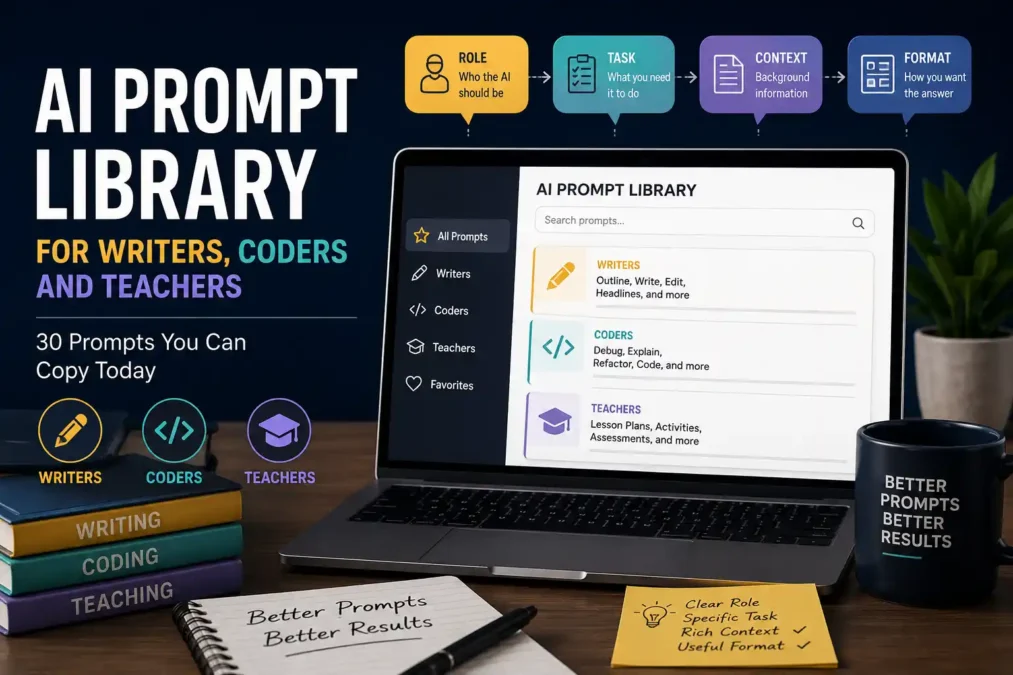
Every prompt in this library, and every prompt you’ll ever write well, follows roughly the same shape: Role, Task, Context, Format. Tell the AI who it should act as, what you need it to do, what background it needs to do it well, and how you want the answer structured. Skip any one of those four and you’ll usually get a generic, forgettable answer back.
I’ve noticed most disappointing AI outputs trace back to a missing “context” piece specifically. People tell the AI what to do but never say who the output is for, so it defaults to the blandest possible version.
Here’s the difference in practice:
- Bad Example: “Write a lesson plan about photosynthesis.”
- Better Example: “You are a 7th grade science teacher. Write a 45-minute lesson plan on photosynthesis for students who already know basic cell structure. Include a warm-up question, one hands-on activity, and three exit-ticket questions. Format it as a table.”
The second version tells the AI who it is (a science teacher), what to do (a lesson plan), the context (7th grade, prior knowledge), and the format (a table). That’s the whole formula, and it’s why the second prompt comes back usable on the first try, not the fifth.
Takeaway: if a prompt keeps disappointing you, check which of the four pieces (role, task, context, format) is missing before you blame the AI. If you want the longer version of this idea, our Prompt Anatomy guide breaks down all six parts a prompt can carry, and Anthropic’s own prompt engineering documentation is worth a look if you want the technique straight from the people who build these models.
This AI prompt library for writers, coders, and teachers splits into three parts from here, so jump straight to whichever one matches what you’re working on today.
AI Prompts for Writers
Writers usually get stuck at one of three points: starting, structuring, or polishing. These prompts cover all three. Swap in your own topic, audience, and tone wherever you see brackets.
- Beat writer’s block on a blank page: “You are a writing coach. I’m writing about [topic] for [audience]. Give me five different opening lines, each using a different hook style (question, statistic, story, contrarian claim, quote), and one sentence explaining why each hook works.”
- Turn a rough idea into an outline: “Act as an editor at a publication that covers [niche]. Take this idea: [your idea]. Build a five-section outline with a one-sentence promise for each section and a suggested word count.”
- Write in a specific voice: “Study the tone, sentence length, and word choice in this sample: [paste 200 words of your own writing]. Now rewrite this paragraph in that same voice: [paste paragraph].”
- Tighten an over-long draft: “You are a ruthless copy editor. Cut this paragraph by 30 percent without losing any of its meaning: [paste paragraph]. List which specific words or phrases you removed and why.”
- Fix a boring headline: “Give me eight alternative headlines for this article: [paste title and one-sentence summary]. Make three curiosity-driven, three benefit-driven, and two question-based. Keep each under 60 characters.”
- Get past feedback that’s too vague: “Read this draft as a skeptical reader who almost clicked away: [paste draft]. Tell me the exact paragraph where you’d stop reading and why.”
- Generate dialogue that sounds real: “Write a short dialogue between two characters: [describe them]. They disagree about [topic]. Keep it under 150 words and avoid any line that sounds like it’s explaining the plot instead of talking naturally.”
- Repurpose one piece into three formats: “Take this blog post: [paste or summarize]. Turn it into a 100-word LinkedIn post, a 5-tweet thread, and a 3-line email subject line and preview text. Keep the core argument identical across all three.”
- Get a second opinion on structure: “Act as a developmental editor. Here’s my outline: [paste outline]. Tell me which section is doing too much work and should be split into two.”
AI Prompts for Coders
Coders tend to use AI for three things: writing new code faster, understanding code someone else wrote, and catching mistakes before a reviewer does. A quick note before the list: if you want more open, community-built prompt sets specifically for coding assistants, GitHub’s prompts topic is worth a browse, it’s free, constantly updated by developers, and a good complement to the ones below.
- Explain unfamiliar code line by line: “You are a senior [language] developer. Explain this function line by line as if I’ve never seen this codebase before: [paste code]. Flag anything that looks like a bug or an unusual pattern.”
- Get a code review before you push: “Review this code for readability, edge cases, and performance: [paste code]. List issues by severity (critical, moderate, minor) and suggest a fix for each critical one.”
- Write unit tests you’d actually trust: “Write unit tests for this function: [paste function]. Cover the happy path, at least two edge cases, and one case that should raise an error. Use [testing framework].”
- Debug an error message you don’t understand: “Here’s my code: [paste code]. Here’s the exact error: [paste error]. Explain what’s causing it in plain English before suggesting a fix.”
- Refactor without breaking behavior: “Refactor this function for readability without changing what it returns: [paste code]. Explain each change you made and why.”
- Convert code between languages: “Convert this [language A] function to idiomatic [language B], not a literal line-by-line translation: [paste code]. Note any behavior that’s different because of language differences.”
- Write documentation you won’t have to rewrite later: “Write a docstring/README section for this function: [paste code]. Include what it does, its parameters, its return value, and one usage example.”
- Plan before you build: “Act as a staff engineer doing a design review. Here’s what I’m trying to build: [describe the feature]. List the three biggest architectural decisions I need to make before writing code, and one question for each.”
- Learn a concept by comparing it to something familiar: “Explain [technical concept] to me using an analogy from [everyday activity you know well]. Then show me a five-line code example of it in [language].”
If you’re new to using an AI model like Claude for this kind of work day to day, our guide on how to use Claude AI walks through getting from a first prompt to something you’d actually ship.
AI Prompts for Teachers (Lesson Planning and Beyond)
Here’s the part that makes AI genuinely worth a teacher’s time: according to the most recent NCES data on teacher planning time, public school teachers get roughly 53 minutes of planning time per day, or just under four and a half hours a week. That’s not much room to build a lesson, differentiate it for three reading levels, and write a rubric, all before the bell. A prompt library doesn’t replace your judgment about what your students need. It just gets you to a usable first draft faster, so your planning time goes toward the parts that actually need a human.
Lesson planning:
- Build a full lesson plan fast: “You are a [grade] [subject] teacher. Write a 45-minute lesson plan on [topic] for students who already know [prior knowledge]. Include a warm-up, one main activity, and three exit-ticket questions. Format it as a table.”
- Differentiate one lesson for three levels: “Take this lesson plan: [paste or describe it]. Rewrite the main activity into three versions: one simplified for struggling readers, one as-is, and one extended for advanced students.”
- Turn a textbook page into a discussion: “Read this passage: [paste text]. Write five discussion questions that move from simple recall to analysis to opinion, following Bloom’s taxonomy.”
- Create a quick formative assessment: “Write a five-question exit ticket for a lesson on [topic] aimed at [grade level]. Mix multiple choice and short answer, and include an answer key.”
- Build a rubric that’s actually usable: “Create a four-level rubric (below expectations, approaching, meeting, exceeding) for a [type of assignment] on [topic], with two criteria: content accuracy and [second criterion, e.g. organization].”
Admin and classroom support:
- Draft a parent email you don’t have to overthink: “Write a short, warm email to a parent explaining that their child is [situation, e.g. struggling with homework completion]. Keep it under 120 words and end with one clear next step.”
- Summarize a long policy document: “Summarize this document in plain language for a busy teacher: [paste document]. Give me the three things that actually change what I do in the classroom.”
- Generate icebreaker or bell-ringer ideas: “Give me five two-minute bell-ringer activities for a [grade] class, none requiring materials beyond paper and pencil, tied loosely to [subject].”
- Write feedback comments faster: “Read this student paragraph: [paste it]. Write two sentences of specific, encouraging feedback that names one strength and one concrete next step.”
- Plan a unit at a glance: “Sketch a five-lesson unit overview on [topic] for [grade/subject], with one sentence per lesson describing its focus and the skill it builds toward.”
- Adapt a lesson for a substitute: “Rewrite this lesson plan so a substitute teacher with no background in [subject] could run it: [paste plan]. Add step-by-step instructions and a backup activity in case of extra time.”
- Build a study guide from your own notes: “Turn these class notes into a one-page study guide for students: [paste notes]. Group ideas under three to five headings and bold the key terms.”
Is It Okay for Teachers to Use AI in Lesson Materials?
Most school districts that have published guidance treat AI the way they treat any other planning tool: fine to use for drafting and saving time, not fine to use as a substitute for a teacher’s own judgment about accuracy, bias, or what a specific class of kids actually needs. The honest answer is that it depends on your district’s policy, so check that first, but using AI to draft a first version of a lesson plan you then review and adjust is exactly the kind of use most guidance is comfortable with.
Common Mistakes People Make With Prompt Libraries
- Copying a prompt without editing the brackets. A prompt written for someone else’s grade level, language, or audience won’t magically fit yours. Always swap in your real details.
- Skipping context to save typing time. A shorter prompt feels faster, but a vague one usually means you’ll spend longer fixing the output than you would have spent writing three extra sentences up front.
- Treating the first output as final. Even a good prompt gives you a draft, not a finished product. Read it like you’d read a student’s or a junior coder’s first pass.
- Never saving what worked. If a prompt got you a great result, write it down somewhere you’ll actually find it again. That’s the entire point of a library instead of a memory.
- Using one giant prompt for everything. A prompt trying to write, format, fact-check, and summarize all at once usually does all four badly. Break big tasks into smaller prompts and chain them.
Frequently Asked Questions
What ChatGPT prompts should teachers use? Start with the lesson-planning and differentiation prompts above, since those cover the two tasks that eat the most planning time. Swap the bracketed details for your grade, subject, and students, and treat the output as a first draft to edit, not a finished lesson.
Can teachers detect AI writing? Not reliably, at least not with software. When researchers tested a batch of well-known detectors, including Turnitin and GPTZero, against ChatGPT-written text, the tools regularly missed passages that had been even lightly reworded, as MIT Technology Review reported on the study. That’s one more reason most schools focus policy on how AI is used, not on trying to catch every instance of it.
How do I become a prompt expert in AI? You don’t need a course for it. Pick five tasks you repeat weekly, write a Role-Task-Context-Format prompt for each one, and refine them every time the output disappoints you. That loop, repeated a few dozen times, teaches you more than reading about prompt engineering ever will.
Will AI learn to code better than humans? AI coding tools are already strong at fast, well-scoped tasks like writing boilerplate, tests, and first-draft functions. Where a human is still doing more of the real work is architecture decisions, understanding why a business needs a feature, and judging tradeoffs a prompt was never given the context to weigh in the first place.
Building Your Own AI Prompt Library for Writers, Coders, and Teachers
None of this works if your AI prompt library for writers, coders, and teachers stays buried in a chat history you’ll never scroll back through. Copy the ones you’ll actually reuse into a doc, a note, or wherever you already keep your work, and treat it as a living list, not a one-time download. Start with two or three prompts from your own category this week, tweak the bracketed details for your real work, and add to the list the next time an AI conversation goes better than expected.
 TechPro Master