
Ever type a detailed description into an AI image tool and get back something that’s almost right, but not quite what you pictured? You wanted a cozy reading nook and got a furniture catalog photo instead. That gap between what’s in your head and what shows up on screen is exactly what DALL-E prompt engineering is meant to close. I’ve spent a lot of hours typing, deleting, and retyping prompts to figure out which words actually move the needle, and the honest answer is that most people are one small change away from a much better image. This guide walks through nine techniques that turn plain, ordinary words into images that actually look like what you imagined, plus what’s changed about DALL-E itself in 2026 that most guides aren’t telling you.
What Is DALL-E Prompt Engineering, Really?
DALL-E prompt engineering just means writing your text prompt in a way that gives the AI model a clear, specific picture of what you want, instead of a vague hint it has to guess at. DALL-E is OpenAI’s text-to-image tool, the one that turns a written description into a picture. Prompt engineering, in general, means shaping your instructions to a model so you get consistent, usable results instead of a random guess.
Think of it like giving directions to a cab driver. If you just say “take me downtown,” you might end up anywhere in a ten-block radius, but if you say “take me to the coffee shop on 5th and Main, next to the bookstore,” the driver knows exactly where to go. DALL-E works the same way: vague input gets you a vague image, and specific input gets you something close to what you pictured.
The takeaway: DALL-E prompt engineering isn’t about knowing secret code words. It’s about being as clear with an AI model as you’d be with a person who’s never seen inside your head.
Wait, Is DALL-E Even Still Around in 2026?
Here’s something most DALL-E prompt engineering guides skip over, and it matters if you’re reading this after mid-2026. OpenAI shut down the DALL-E 2 and DALL-E 3 models in its API on May 12, 2026, and confirmed it’s retiring the standalone DALL-E tool inside ChatGPT on August 30, 2026 too, according to reporting on OpenAI’s release notes. The replacement is called ChatGPT Images, built on a newer model called GPT Image 2.
So does that make this whole guide pointless? No, and here’s why. The prompt-writing skills you’re about to learn, writing in full sentences, describing lighting and mood, structuring subject before style, all carry straight over to GPT Image 2 and to ChatGPT Images. The tool’s name changed. The way you talk to it barely did. I still catch myself calling it “DALL-E” out of habit, and honestly, most people searching for this topic do too, which is exactly why the term has stuck around even as the model behind it moved on.
If you’re using ChatGPT today, you’re most likely typing into ChatGPT Images already, even if the interface still feels familiar.
The Anatomy of a DALL-E Prompt That Works
Every strong DALL-E prompt follows a similar shape, even if the topic changes completely. Break your idea into three parts: the subject, which is who or what is in the image, the setting, which is where and when it’s happening, and the style, which is how it should look, whether that’s photographic, painterly, or something else entirely. Layer those three in order and the model has a much easier time filling in the blanks the right way.
If you’ve read our post on prompt anatomy, you’ll recognize the pattern. Image prompts and text prompts aren’t as different as they look. Both work better when you give the model context, a clear task, and constraints, instead of a single vague sentence and a hope for the best.
Here’s what that looks like in practice.
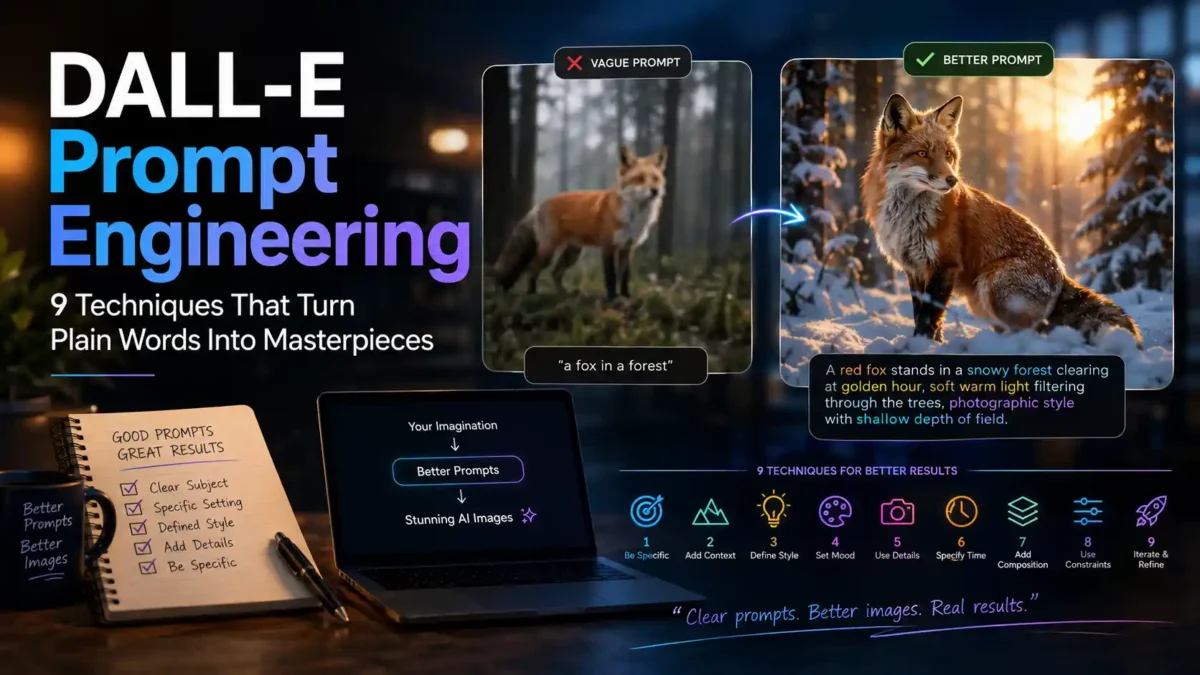
Bad prompt: “a fox in a forest”
Better prompt: “A red fox stands in a snowy forest clearing at golden hour, soft warm light filtering through the trees, photographic style with shallow depth of field.”
The bad version leaves everything up to chance: time of day, weather, camera angle, art style. The better version answers those questions before the model has to guess, so you get something much closer to what you pictured on the first try. That subject-setting-style order is the backbone of good DALL-E prompt engineering, no matter what you’re trying to create.
DALL-E Prompt Engineering: ChatGPT vs the API
Where you type your prompt changes how much control you actually have, and this trips up more beginners than any single wording choice. Inside ChatGPT, you’re not talking to the image model directly. ChatGPT reads your request, rewrites it into a longer, more detailed prompt behind the scenes, and only then sends that expanded version to the image model. This “prompt upsampling” step is why a short, casual request in ChatGPT can still come back looking polished, but it also means you have less direct control than you’d think.
Through the raw API, the direct programming connection developers use to talk to the model without going through ChatGPT’s interface, there’s no rewrite layer standing between you and the model. What you type is what gets sent, which gives you precise control over settings like image size and the vivid or natural style toggle, but it also means the model won’t quietly fix a vague or messy prompt for you. If you want hand-holding, ChatGPT is the easier route. If you want exact, repeatable control for a product or workflow, the API is worth the extra setup.
9 Techniques That Turn Plain Words Into Masterpieces
These are the habits that separate a flat, generic result from an image that actually matches what you had in mind. Work through them in order and you’ll notice your DALL-E prompt engineering improving with almost every attempt.
1. Write full sentences, not a pile of keywords
DALL-E was trained on descriptive captions, not keyword tags, so it responds much better to full sentences than to a list separated by commas.
Bad prompt: “forest, morning, fog, deer, cinematic, 4k”
Better prompt: “A deer stands in a foggy forest at dawn, its breath visible in the cold morning air, shot in a cinematic style.”
The keyword list confuses the model because it can’t tell how those words relate to each other. The sentence version tells one clear story, and that’s the format DALL-E was actually trained to understand. This single change fixes more weak prompts than anything else on this list.
2. Put the camera and composition into words
DALL-E can’t read your mind about angles, so tell it directly. Phrases like “close-up portrait,” “wide establishing shot,” or “bird’s-eye view” work well. Spatial instructions like “to the left of” are hit or miss, because the model doesn’t always place objects with that kind of precision, so it’s safer to describe the whole scene as one unit instead of positioning pieces separately.
3. Choose vivid or natural on purpose
If you’re using the API, the style parameter lets you pick “vivid,” which leans hyper-real and dramatic, or “natural,” which looks closer to an ordinary photograph, according to OpenAI’s own documentation. Inside ChatGPT, you don’t get that toggle directly, but you can describe the same effect in words: add “dramatic, high-contrast lighting” for a vivid look, or “soft, natural daylight, true-to-life colors” for the calmer option.
4. Name a medium and a style reference
Telling the model what kind of image you want, a watercolor painting, a 35mm film photograph, a vector illustration, does more work than any number of extra adjectives. Style words anchor the whole image, the way telling a chef “make it Italian” narrows a thousand possible dishes down into a much smaller, clearer set.
5. Describe lighting and mood instead of naming emotions
Saying “make it look happy” doesn’t give DALL-E much to work with. Saying “warm golden-hour light, soft shadows, a relaxed and unhurried feel” gives it something visual to render. Emotions are abstract, light and color are concrete, and concrete details are what actually shape pixels.
6. Be careful asking for text inside the image
DALL-E handles text in images better than older generators, but it’s still not perfect, so keep any requested text short, like a single word or short phrase on a sign or logo, and expect to regenerate a couple of times if the spelling comes out wrong.
7. Iterate instead of trying to nail it in one shot
Your first prompt is a draft, not a final answer. Start with the core idea, “a cozy coffee shop interior,” check whether that part works, then add details one layer at a time: lighting, then mood, then style. Stacking more than five or six distinct elements into one prompt tends to overwhelm the model and produce a muddled result. This is the same progressive approach we cover in our guide to advanced prompting techniques, and it works just as well for images as it does for text.
8. Know what triggers a content policy rejection
DALL-E’s safety filters block real people’s names, copyrighted characters like Mickey Mouse or Pikachu, and anything that reads as violent or explicit, even when your intent is completely harmless. If a prompt gets rejected, don’t try to sneak around the filter with clever wording, since that usually backfires. Instead, describe visual traits rather than naming a person, and swap a named character for a generic description of what they look like.
9. Let the model work from a reference
If you’re prompting through ChatGPT rather than the raw API, you can describe a reference image in words, or upload one, and ask the model to match its lighting, color grading, or composition. This gets you closer to a specific look without needing to know the technical vocabulary for it yourself, since ChatGPT translates your plain description into the more structured language the image model responds to.
Common Mistakes That Wreck DALL-E Prompts
- Stacking too many ideas into one prompt. More than five or six distinct elements usually confuses the model instead of helping it.
- Using vague emotion words instead of visual details. “Epic” and “beautiful” don’t render, but “dramatic lighting” and “intricate detail” do.
- Fighting the content filter with workarounds. Trying to sneak past a rejection with clever phrasing almost always backfires, since the system is built to catch exactly that.
- Forgetting that ChatGPT rewrites your prompt. If your image looks off, it might be the rewrite and not your original wording, so ask ChatGPT to show you the revised prompt it actually used.
- Giving up after one bad result. Most strong images take three or four rounds of small adjustments, not one perfect shot.
Avoiding these five habits alone will do more for your DALL-E prompt engineering than memorizing any list of magic words.
FAQ
Is DALL-E prompt engineering still worth learning if the model is being retired? Yes. The tool’s name is changing, but the underlying skill, describing scenes clearly, structuring subject before style, iterating instead of one-shotting, transfers directly to GPT Image 2 and ChatGPT Images.
Do negative prompts work in DALL-E? Not the way they do in Stable Diffusion or Midjourney. DALL-E doesn’t have a dedicated negative-prompt field, so instead of saying “no clouds,” describe what you do want, like “a clear blue sky.”
How long can a DALL-E prompt be? Longer prompts generally work, and DALL-E handles more detail than older image generators, but returns start to shrink past five or six distinct elements. More words don’t automatically mean a better image.
Can I use the same DALL-E prompt engineering techniques for Midjourney or Stable Diffusion? Partly. The core ideas, subject, setting, style, and iteration, carry over, but those tools use tag-style syntax and parameters that DALL-E doesn’t need, so a prompt written for one won’t paste directly into another.
Conclusion
So, back to that gap between the image in your head and the one on your screen. DALL-E prompt engineering, or GPT Image prompting, or whatever name the tool goes by next year, comes down to the same handful of habits: describe scenes in full sentences, structure subject before style, and iterate instead of demanding perfection on the first try. None of that requires special software or secret syntax. It just requires being as specific with the model as you’d be with a person.
Start small on your next prompt. Pick one technique from this list, maybe writing in full sentences instead of tags, and try it on something you’re working on right now. You’ll notice the difference before you finish your second attempt. And if you want to keep building this skill, our guide to prompting ChatGPT and our AI prompt library are good next stops.

 TechPro Master