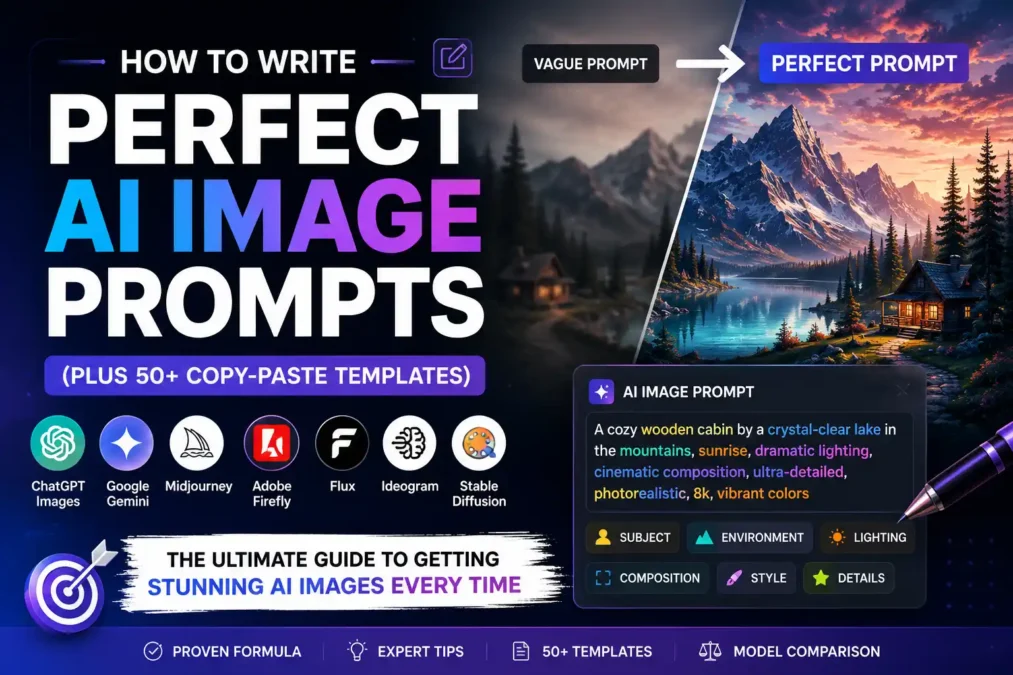

You type a few words into an AI image tool, hit generate, and get back something that looks nothing like what was in your head. Maybe the lighting is flat. Maybe the hands are wrong. Maybe the whole image just feels generic, like it came off a stock photo site instead of your imagination. If that’s happened to you more than once, the problem almost certainly isn’t the AI model. It’s the AI image prompt you gave it.
This guide is going to fix that. By the end, you’ll know exactly how to write an AI image prompt that tells the model what you actually want, in a language it understands, whether you’re using ChatGPT Images, Google Gemini, Midjourney, Adobe Firefly, Flux, Ideogram, or Stable Diffusion. You’ll get a repeatable prompt formula, dozens of ready-to-copy templates sorted by use case, a model-by-model comparison, and a full breakdown of the words and phrases that separate a flat, generic AI image from one that looks like it was made by a professional.
I’ve spent a lot of time testing the same idea across different models just to see how differently they interpret the exact same words, and that’s really what this whole guide is built on: real, testable patterns, not guesswork.
What Is an AI Image Prompt, Really?
An AI image prompt is the written instruction you give an image-generating AI model, describing the picture you want it to create. Think of it less like a search query and more like a set of directions you’d give a photographer or illustrator who’s never met you and can’t ask follow-up questions. Everything the model knows about your intended image comes from the words in that one prompt.
That’s the part beginners usually miss. A search engine can guess what you mean from a vague query and still hand back something useful, because it’s pulling from real content that already exists. An image model isn’t retrieving anything. It’s generating a picture from scratch, pixel pattern by pixel pattern, based on statistical patterns it learned from millions of image-and-caption pairs during training. So the vaguer your prompt, the more the model has to guess, and the more likely it is to guess wrong. If you want the fundamentals of prompt writing in general before narrowing in on images, the six-part structure behind every good AI prompt is a good place to start.
Quick definition: an AI image prompt is a text description, made up of details like subject, style, lighting, and composition, that an AI model converts into a generated image.
Why Most AI Image Prompts Fail
Most weak prompts fail for one of three reasons, and none of them require you to be a “prompt engineer” to fix.
- Too vague: “a cool car” tells the model almost nothing. Which car? What angle? What lighting? The model fills in every blank with whatever’s statistically average in its training data, which is exactly why vague prompts tend to produce bland, generic-looking results.
- Too crowded: the opposite problem. Cramming twenty unrelated ideas into one prompt (a dragon, a coffee shop, cyberpunk neon, Victorian architecture, and a golden retriever) forces the model to compromise on all of them at once, and compromise usually looks like mush.
- Missing the technical layer: even a well-described subject falls flat without lighting, composition, and style cues. This is the layer that turns “a woman drinking coffee” into a specific, intentional image instead of a random one.
Once you understand the formula in the next section, all three of these get a lot easier to catch before you even hit generate.
How AI Image Models Actually “Read” Your Prompt
Here’s the part that makes everything else in this guide click into place. When you type a prompt, the model doesn’t read it as one long sentence the way a person would. It breaks your words into small chunks called tokens, roughly word-sized pieces, and converts each one into a mathematical representation of meaning. Then it uses those representations to guide a step-by-step image-generation process, gradually shaping random noise into a picture that statistically matches what your tokens describe.
That’s a simplified version of what’s actually a pretty complex process, but the practical takeaway is this: word order and specificity matter, because the model weighs early and specific details more heavily than vague ones buried at the end of a long sentence.
Think of it like giving directions to a cab driver. “Take me somewhere nice” gets you nowhere useful. “Take me to the Italian place on 5th and Main, the one with the red awning” gets you exactly where you meant to go. AI image prompts work the same way. Specific, front-loaded details beat vague, scattered ones every time.
Why Specificity Beats Length
A common mistake is assuming a longer prompt is automatically a better prompt. It isn’t. A 200-word prompt full of vague adjectives (“beautiful,” “amazing,” “high quality”) will usually lose to a tight 40-word prompt that names an actual lens, an actual lighting setup, and an actual mood. Specific beats long, every time.
The Core AI Image Prompt Formula
Every strong AI image prompt, no matter which model you’re using, tends to follow the same underlying structure. Think of it as eleven building blocks. You won’t use all eleven in every single prompt, but knowing what each one does means you can add exactly the missing piece when a result isn’t working, instead of just re-rolling the same vague prompt over and over.
Here’s the formula at a glance:
Subject + Style + Lighting + Composition + Camera + Mood + Environment + Colors/Materials + Perspective + Aspect Ratio + Quality
Let’s go through each one.
Subject: What’s Actually in the Frame
The subject is the who or what of your image, and it’s where most people stop, which is the whole problem. “A dog” is a subject. “An elderly golden retriever with a graying muzzle, sitting alert on a porch step” is a subject with enough detail that the model has something real to work with.
Bad prompt: “a woman in a city” Better prompt: “a woman in her 30s wearing a tan trench coat, walking through a rain-soaked city street at dusk”
The better version doesn’t just add words. It answers questions the model would otherwise have to guess at: how old, wearing what, doing what, where, and when.
Style: The Art Direction
Style tells the model what visual language to render your subject in: photorealistic, oil painting, 3D render, flat vector illustration, anime, watercolor, and so on. Skip this and most models will default to a kind of generic digital-art look that doesn’t really commit to anything.
Bad prompt: “a mountain landscape” Better prompt: “a mountain landscape, oil painting style, visible brushstrokes, Hudson River School influence”
Lighting: The Detail That Sells Realism
Lighting is probably the single most underused ingredient in weak prompts, and it’s also the fastest way to make an image look intentional instead of accidental. “Golden hour lighting,” “harsh studio flash,” “soft window light,” and “moody low-key lighting” all produce dramatically different images from the exact same subject.
Bad prompt: “a portrait of a man” Better prompt: “a portrait of a man, lit by soft window light from the left, warm tones, gentle shadows”
Here’s a quick reference for common lighting styles and the mood each one tends to produce:
| Lighting Style | Typical Mood | Best Used For |
|---|---|---|
| Golden hour | Warm, romantic, nostalgic | Portraits, landscapes, lifestyle shots |
| Blue hour | Calm, cinematic, cool | Cityscapes, moody portraits |
| Studio softbox | Clean, professional, even | Product shots, headshots |
| Hard flash | Bold, high-contrast, editorial | Fashion, street photography |
| Rembrandt lighting | Dramatic, classic, sculptural | Portraits, character art |
| Backlighting / rim light | Ethereal, glowing edges | Silhouettes, fantasy scenes |
| Neon / practical lighting | Energetic, futuristic | Cyberpunk, night scenes |
| Overcast / diffused | Soft, muted, natural | Documentary style, food photography |
Composition & Camera: How the Shot Is Framed
Composition tells the model how to arrange the scene: close-up, wide shot, rule of thirds, symmetrical framing, low angle. Camera details go one layer deeper, specifying things like lens type, focal length, and depth of field, which matters a lot for anything meant to look like a real photograph.
Bad prompt: “a cat on a windowsill” Better prompt: “a close-up shot of a cat on a windowsill, shallow depth of field, shot on an 85mm lens, blurred background”
A short analogy here: composition and camera details are like telling a chef not just what dish to make, but what plate to serve it on and from what angle to photograph it. Same ingredients, completely different presentation.
Mood & Atmosphere
Mood is the emotional tone you want the viewer to feel: eerie, joyful, tense, peaceful, melancholic. It’s a small addition that has an outsized effect on how the model chooses colors, expressions, and even weather.
Bad prompt: “a forest” Better prompt: “a dense forest at twilight, eerie and quiet, fog drifting between the trees”
Environment & Setting
This is where and when the scene takes place: indoors or outdoors, what era, what season, what kind of location. Without it, the model has to invent a setting from scratch, which is exactly how you end up with a subject floating in a vague, undefined space.
Colors & Materials
Naming specific colors and materials (rusted steel, brushed gold, deep emerald green, weathered oak) gives the model something concrete to render instead of picking an average. This matters especially for product shots, architecture, and fashion prompts, where the material itself is often the point.
Perspective & Aspect Ratio
Perspective covers the viewpoint: eye-level, bird’s-eye view, worm’s-eye view, over-the-shoulder. Aspect ratio controls the shape of the final image (square, widescreen, vertical), which most tools let you set with a short parameter like --ar 16:9 in Midjourney. Getting this right upfront saves you from generating a beautiful image in the wrong shape for where you actually need it, like a vertical portrait when you needed a horizontal banner.
Quality Modifiers
Terms like “highly detailed,” “8k,” “sharp focus,” and “professional photography” nudge the model toward a cleaner, more polished render. They’re not magic words that guarantee quality on their own, but paired with everything else in the formula, they do measurably help, especially on models like Midjourney and Stable Diffusion.
Negative Prompts: What to Leave Out
A negative prompt tells the model what you don’t want to see, and it’s supported by Midjourney, Stable Diffusion, and several other tools (though not all of them, which we’ll cover in the model-by-model section). It’s especially useful for fixing recurring problems like distorted hands, extra limbs, watermarks, or blurry text.
Example negative prompt: --no blurry, extra fingers, watermark, low quality, distorted anatomy
Prompt Weighting & Syntax
Some models let you tell them which parts of your prompt matter most, using weighting syntax. In Midjourney, ::2 after a word or phrase increases its importance. In Stable Diffusion tools, parentheses like (dramatic lighting:1.3) do something similar. This isn’t universal across every model, so I’ll flag exactly where it applies in the model-by-model section coming up.
Bad Prompt vs Good Prompt: Real Before/After Examples
Seeing the formula applied side by side makes it click faster than reading about it in the abstract. Here are five real transformations, going from a vague first attempt to a fully formed AI image prompt.
| Bad Prompt | Good Prompt |
|---|---|
| “a coffee shop” | “a cozy coffee shop interior, warm morning light through large windows, steam rising from a ceramic mug on a wooden table, shallow depth of field, shot on 50mm lens” |
| “a robot” | “a weathered industrial robot standing in an abandoned factory, rust and exposed wiring, cinematic lighting, moody blue and orange color grade, wide shot” |
| “a birthday cake” | “a three-tier birthday cake with pastel pink buttercream, fresh berries on top, soft natural light, shot from a 45-degree angle, shallow depth of field, food photography style” |
| “a superhero” | “a female superhero in a matte black tactical suit, standing on a rooftop at night, city lights blurred behind her, low angle shot, dramatic rim lighting, comic book illustration style” |
| “a logo for a bakery” | “a minimalist logo for an artisan bakery, line-art wheat stalk icon, warm terracotta and cream color palette, flat vector style, clean negative space, centered composition” |
Notice the pattern: every “good” version answers subject, style, lighting, and composition at minimum, and most of them layer in mood or color on top. That’s the formula doing its job.
Model-by-Model Prompt Guide
Here’s something the formula alone won’t tell you: the exact same prompt can produce noticeably different results depending on which AI model you’re using, because each one was trained differently and interprets language a little differently. Below is a practical breakdown of the major AI image models and how to write image prompts that actually play to each one’s strengths.
ChatGPT Images (GPT Image Model)
ChatGPT’s image generation tends to respond well to natural, conversational prompts, closer to how you’d actually describe a scene to a person than to a string of comma-separated keywords. It’s also strong at following detailed, multi-part instructions and text rendering inside images.
Example prompt: “Create a photorealistic image of a golden retriever puppy sitting in a wicker basket lined with a soft blue blanket, soft natural window light, shallow depth of field, warm and cozy atmosphere.”
Tip: Because ChatGPT understands conversational follow-ups, you can refine an image in plain language afterward, like “make the lighting warmer” or “move the basket closer to the window,” instead of rewriting the whole prompt from scratch. For the official rundown of parameters and behavior, see OpenAI’s image generation guide. And if you want to get better at ChatGPT prompting in general, not just for images, this walkthrough for ChatGPT prompt engineering covers the basics.
Google Gemini (Including “Nano Banana”)
Gemini’s image generation, especially the model nicknamed “Nano Banana” by users after its release, has become one of the most searched AI image tools this year, largely because of its strong photo-editing and image-blending capabilities. It handles both text-to-image generation and editing existing photos with a text instruction, which makes it different from most of the other tools on this list.
Example prompt: “A professional headshot of a person in a navy blazer, studio lighting, neutral gray background, sharp focus, corporate photography style.”
Tip: Gemini tends to do especially well with prompts that describe realistic, photographic scenes and with editing instructions layered on top of an uploaded photo, like “keep the person the same but change the background to a modern office.” Google’s own documentation on Gemini image generation covers the latest capabilities in more depth.
Midjourney
Midjourney rewards a more compressed, keyword-driven style over full sentences, and it has its own parameter syntax for controlling aspect ratio, stylization, and quality.
Example prompt: elderly fisherman mending nets on a wooden dock, golden hour lighting, weathered hands, documentary photography style, shot on 35mm --ar 3:2 --v 6
Tip: Midjourney’s --stylize parameter (shortened to --s) controls how much artistic interpretation the model adds on top of your literal description. Lower values stay closer to your exact words, higher values lean more artistic. Midjourney’s own Prompt Basics documentation is worth bookmarking for the full parameter list.
Adobe Firefly
Firefly is trained exclusively on licensed Adobe Stock content and public domain material, which makes it a common choice for commercial work where licensing clarity matters. It responds well to structured, descriptive prompts and integrates directly into Photoshop and Illustrator.
Example prompt: “A modern minimalist living room, Scandinavian design, natural wood tones, large windows with soft daylight, potted plants, editorial interior photography style.”
Tip: Firefly’s built-in style presets (like “Photo,” “Art,” or “Graphic”) are worth combining with your written prompt rather than relying on text description alone. Adobe publishes its own official prompt guide for Firefly if you want to go deeper.
Flux
Flux, developed by Black Forest Labs, has built a reputation for strong prompt adherence, meaning it tends to follow detailed, complex prompts more literally than some other models, including tricky things like specific text rendering and precise spatial relationships between objects.
Example prompt: “A red vintage bicycle leaning against a pale blue wall, a woven basket on the front filled with sunflowers, cobblestone street, soft afternoon light, film photography aesthetic.”
Tip: Because Flux follows instructions closely, it’s a good choice when you need very specific spatial arrangements, like “the cat sitting to the left of the lamp, with the window visible in the background.” Black Forest Labs maintains an official FLUX prompting guide with model-specific detail.
Ideogram
Ideogram has built its niche around one specific strength: rendering readable, accurate text inside images, which is historically one of the hardest things for AI image models to get right. It’s a strong pick for logos, posters, and marketing graphics that need actual words in them.
Example prompt: “A vintage-style poster with the text ‘SUMMER FESTIVAL’ in bold retro typography, sunset color palette, palm tree silhouettes, 1970s travel poster aesthetic.”
Tip: Keep the exact text you want rendered in quotation marks within your prompt. It noticeably improves accuracy compared to just describing that text should be present. Ideogram’s official prompting fundamentals guide is a solid reference for this.
Stable Diffusion
Stable Diffusion is open-source, which means it comes in many fine-tuned versions and supports the widest range of custom models and community tools of anything on this list. It also has the most mature negative-prompt and weighting syntax.
Example prompt: (masterpiece, best quality), a cyberpunk street market at night, neon signs reflecting on wet pavement, crowded stalls, cinematic lighting --neg blurry, low quality, watermark
Tip: Because Stable Diffusion has so many community fine-tunes (realistic photo models, anime models, art-style models), the “best” prompt style actually depends on which specific version you’re running. Check Stability AI’s official guides for its preferred prompt format before assuming one universal approach works everywhere.
If all of this has you wanting to build better prompting habits beyond just images, this library of 30 ready-to-copy AI prompts for writing, coding, and teaching is worth a look too.
Comparison Table: Which AI Image Model Should You Use?
| Model | Prompt Style | Best For | Supports Negative Prompts | Text Rendering |
|---|---|---|---|---|
| ChatGPT Images | Natural, conversational | Iterative editing, following complex instructions | Limited | Strong |
| Google Gemini | Natural, photographic | Photo editing, realistic images | Limited | Good |
| Midjourney | Keyword-driven, parameters | Artistic, stylized imagery | Yes | Weak |
| Adobe Firefly | Structured, descriptive | Commercial/licensed work | Limited | Moderate |
| Flux | Detailed, literal | Precise spatial control | Yes | Strong |
| Ideogram | Descriptive + quoted text | Logos, posters, text-heavy graphics | Yes | Excellent |
| Stable Diffusion | Keyword + weighting syntax | Customization, open-source flexibility | Yes | Weak |
Prompt Templates for Every Use Case
These are fill-in-the-blank AI image prompt templates you can copy, swap out the bracketed details, and use right away. They’re organized by the kind of image people search for most, from portraits to marketing graphics.
Portrait & Headshot Prompts
- Professional headshot: “A professional headshot of a [age/gender description] wearing [clothing], [lighting style] lighting, [background color] background, sharp focus, corporate photography style”
- Casual lifestyle portrait: “A candid portrait of a [subject] laughing, natural outdoor light, shallow depth of field, shot on 85mm lens, warm color grade”
- Dramatic character portrait: “A close-up portrait of [subject], Rembrandt lighting, dark moody background, intense expression, fine art photography style”
- Studio fashion portrait: “A fashion portrait of a model in [outfit description], studio softbox lighting, seamless [color] backdrop, editorial photography style”
Product Photography Prompts
- Clean product shot: “A on a [surface material], soft studio lighting, white seamless background, product photography style, sharp focus”
- Lifestyle product shot: “A on a wooden table next to [supporting props], natural window light, shallow depth of field, warm lifestyle photography style”
- Floating product shot: “A floating against a gradient [color] background, dramatic side lighting, high-end commercial photography style”
- Flat lay product shot: “An overhead flat lay of surrounded by [supporting props], soft even lighting, minimalist composition, top-down view”
Architecture & Interior Prompts
- Exterior architecture: “A [architectural style] building at [time of day], dramatic sky, wide-angle shot, architectural photography style”
- Modern interior: “A [room type], [design style] design, natural daylight through large windows, minimalist furniture, editorial interior photography style”
- Cozy interior: “A cozy [room type] with warm lighting, [material] furniture, soft shadows, lived-in atmosphere, evening light”
- Aerial architecture: “A bird’s-eye view of [structure/city], golden hour lighting, long shadows, drone photography style”
Food Photography Prompts
- Overhead food shot: “An overhead shot of [dish], garnished with [garnish], soft natural light, rustic wooden table, food photography style”
- Close-up food detail: “A close-up of [dish], steam rising, shallow depth of field, warm side lighting, appetizing food photography style”
- Beverage shot: “A glass of [beverage] with condensation, soft backlighting, blurred background, refreshing summer mood”
- Plated dish: “A beautifully plated [dish] on a [color] ceramic plate, shot from a 45-degree angle, restaurant-quality food photography”
Nature & Landscape Prompts
- Mountain landscape: “A [mountain range] at [time of day], dramatic clouds, [season], wide-angle landscape photography, vivid natural colors”
- Forest scene: “A dense [forest type] with light rays filtering through the canopy, misty atmosphere, moody and peaceful, nature photography style”
- Ocean/coastal scene: “A rocky coastline at [time of day], crashing waves, dramatic sky, long exposure photography style”
- Seasonal landscape: “A [season] landscape with [key feature], soft natural light, wide shot, fine art nature photography”
Fantasy & Sci-Fi Prompts
- Fantasy creature: “A [creature description] in a [fantasy environment], glowing [color] light, epic fantasy illustration style, highly detailed”
- Fantasy landscape: “A floating island with [key features], magical atmosphere, dramatic lighting, digital fantasy art style”
- Sci-fi cityscape: “A futuristic cityscape at night, neon lights, flying vehicles, cyberpunk aesthetic, cinematic wide shot”
- Sci-fi character: “A [character description] in advanced armor, standing on an alien planet surface, dramatic rim lighting, concept art style”
Anime & Manga Prompts
- Anime character portrait: “An anime-style portrait of a [character description], vibrant [color] hair, expressive eyes, soft cel-shaded lighting, studio anime art style”
- Anime action scene: “An anime-style action scene of [character] in mid-motion, dynamic pose, speed lines, dramatic sky background”
- Slice-of-life anime scene: “An anime-style scene of [setting], soft pastel colors, warm afternoon light, peaceful mood, Studio Ghibli-inspired style”
- Manga panel style: “A black-and-white manga-style panel of [scene], bold ink linework, dramatic screentone shading”
Cinematic Scene Prompts
- Establishing shot: “A wide cinematic establishing shot of [location] at [time of day], film grain, anamorphic lens flare, moody color grade”
- Character close-up: “A cinematic close-up of [character] with an intense expression, shallow depth of field, teal and orange color grade”
- Action scene: “A cinematic action shot of [subject] mid-motion, motion blur, dramatic lighting, film still aesthetic”
- Emotional scene: “A quiet cinematic moment of [subject] in [setting], soft window light, muted color palette, contemplative mood”
3D Render Prompts
- Product 3D render: “A 3D render of , studio lighting, glossy material, clean gradient background, octane render style”
- Character 3D render: “A stylized 3D character render of [character description], soft studio lighting, Pixar-inspired style, clean background”
- Abstract 3D render: “An abstract 3D render of [shapes/materials], soft gradient lighting, minimalist composition, high-end 3D art style”
- Environment 3D render: “A 3D rendered environment of [setting], volumetric lighting, realistic materials, architectural visualization style”
Logo Design Prompts
- Minimalist logo: “A minimalist logo for a [business type], [icon description], [color palette], flat vector style, clean negative space”
- Emblem-style logo: “A vintage emblem-style logo for [business type], circular badge design, [color palette], hand-drawn linework”
- Wordmark logo: “A modern wordmark logo for ‘[business name]’ in a [font style] typeface, [color palette], flat design”
- Mascot logo: “A friendly mascot-style logo of a [character/animal] for [business type], bold outlines, flat vector illustration style”
Poster Design Prompts
- Event poster: “A poster for a [event type] with the text ‘[event name]’ in bold typography, [color palette], [visual theme]”
- Movie-style poster: “A cinematic movie poster featuring [subject], dramatic lighting, bold title text, [genre] mood”
- Minimalist poster: “A minimalist poster with [key visual], plenty of negative space, muted color palette, modern typography”
- Retro poster: “A retro-style poster with the text ‘[headline]’, [decade] design aesthetic, sun-faded color palette”
YouTube Thumbnail Prompts
- Reaction-style thumbnail: “A YouTube thumbnail of a person with a shocked expression, bold [color] background, high contrast, large readable text space”
- Tutorial thumbnail: “A YouTube thumbnail showing [subject/tool], clean bright lighting, bold arrow or highlight element, tech tutorial style”
- Vlog thumbnail: “A YouTube thumbnail of [subject] in [location], vibrant colors, energetic composition, lifestyle vlog style”
- Gaming thumbnail: “A YouTube thumbnail featuring [game character/scene], dramatic lighting, high saturation, bold contrast, gaming aesthetic”
Marketing & Social Media Prompts
- Instagram lifestyle post: “A lifestyle image of [subject] using , soft natural light, warm and aspirational mood, Instagram-style photography”
- Ad banner visual: “A clean product advertisement visual of , bold [color] background, plenty of space for text overlay”
- Social media carousel: “A minimalist illustration of [concept], flat design, [brand color palette], consistent style for a social media carousel”
- Testimonial background: “A soft blurred background of [setting], warm tones, plenty of negative space for a text overlay quote”
Prompt Modifier Cheat Sheet
Once you know the formula, the fastest way to level up your prompts is building a mental library of modifier words, the specific terms that consistently produce specific effects. Here’s a reference set you can pull from.
Camera & Lens Terms
| Term | Effect |
|---|---|
| 35mm lens | Slightly wide, natural-looking perspective |
| 50mm lens | Standard, closest to human eye perspective |
| 85mm lens | Flattering compression, common for portraits |
| Macro lens | Extreme close-up detail |
| Fisheye lens | Distorted, ultra-wide, curved edges |
| Shallow depth of field | Blurred background, sharp subject |
| Wide angle | Expansive scene, more background visible |
| Telephoto | Compressed distance, isolated subject |
Lighting Styles
| Term | Effect |
|---|---|
| Golden hour | Warm, soft, low-angle sunlight |
| Blue hour | Cool, calm, post-sunset tones |
| Studio softbox | Even, professional, shadow-controlled |
| Rembrandt lighting | Triangle of light on the cheek, dramatic |
| Backlighting | Glowing rim around the subject |
| Volumetric lighting | Visible light rays/god rays |
| Low-key lighting | Dark, moody, high contrast |
| High-key lighting | Bright, even, minimal shadow |
Art & Painting Styles
| Term | Effect |
|---|---|
| Oil painting | Rich texture, visible brushstrokes |
| Watercolor | Soft edges, translucent color blending |
| Flat vector illustration | Clean shapes, no gradients or texture |
| Impressionist | Loose brushwork, light-focused |
| Concept art | Detailed, painterly, production-ready look |
| Line art | Clean outlines, minimal or no shading |
| Cel-shaded | Flat color blocks with hard shadow edges |
Rendering Engines & Technical Terms
| Term | Effect |
|---|---|
| Octane render | Glossy, photorealistic 3D rendering |
| Unreal Engine | Highly detailed, game-realistic rendering |
| Ray tracing | Realistic light bounce and reflection |
| Volumetric fog | Atmospheric depth and haze |
| Subsurface scattering | Realistic skin/translucent material rendering |
Color Grading Terms
| Term | Mood |
|---|---|
| Teal and orange | Cinematic, blockbuster movie look |
| Muted pastels | Soft, gentle, nostalgic |
| Desaturated | Somber, serious, documentary |
| High saturation | Energetic, bold, playful |
| Sepia tone | Vintage, historical, warm |
Negative Keywords Worth Knowing
These are common problem words to add to a negative prompt (on models that support it) when you keep running into the same issues:
- For distorted anatomy: extra fingers, extra limbs, deformed hands, disproportionate body
- For low quality results: blurry, low resolution, pixelated, jpeg artifacts
- For unwanted text/branding: watermark, signature, logo, text overlay
- For composition issues: cropped, out of frame, duplicate, cluttered background
Common Mistakes to Avoid When Writing AI Image Prompts
Even once you know the formula, a handful of habits quietly sabotage results. Here are the ones I see (and catch myself making) most often.
- Being vague on purpose to “let the AI be creative.” This almost never works the way people hope. Vague prompts don’t produce more creative results, they produce more average, generic ones, because the model has nothing specific to anchor to.
- Stacking contradictory styles. Asking for “photorealistic anime watercolor” gives the model three different visual languages to blend at once, and the result usually looks confused rather than original.
- Forgetting the negative prompt on models that support it. If you keep getting the same flaw (extra fingers, watermarks, weird text), a negative prompt fixes it faster than rewriting your main prompt five times.
- Ignoring aspect ratio until after generating. Set it upfront. Regenerating a great image in the wrong shape wastes time you didn’t need to spend.
- Copying someone else’s exact prompt and expecting identical results. Different models, different versions, and even different days can produce different outputs from the same prompt, since most models have some built-in randomness (often called a “seed”). Use other people’s prompts as a starting template, not a guarantee.
- Overloading one prompt with too many separate ideas. If your prompt has more than two or three distinct concepts competing for attention, split it into multiple generations instead.
Expert Tips for Better AI Image Prompts
- Front-load your most important detail. Since models weigh earlier tokens more heavily, put your single most important requirement (the subject, or a specific style) at the start of the prompt, not buried in the middle.
- Iterate instead of starting over. Most modern tools, including ChatGPT Images and Gemini, let you refine an existing image with a follow-up instruction. That’s usually faster than rewriting the whole prompt from scratch.
- Build a personal swipe file. Keep a running document of prompts that worked well for you. I keep mine sorted by use case, and it’s saved me more time than any single trick in this guide.
- Study your favorite AI images backward. When you see a generated image you love, try to reverse-engineer which formula elements it likely used: what’s the lighting, what’s the composition, what’s the style. This trains your eye faster than any tutorial.
- Test the same prompt across two models. Since each model interprets language a little differently, running one prompt through two different tools quickly shows you which one fits your specific style better.
Quick Recap: The AI Image Prompt Checklist
Before you hit generate, run through this:
- Subject: Is it specific enough that the model isn’t guessing?
- Style: Have you named an actual art direction, not just “good quality”?
- Lighting: Have you specified a lighting style?
- Composition & camera: Do you know the shot type and angle?
- Mood: Does the prompt convey an emotional tone?
- Environment: Is the setting clear?
- Colors/materials: Are there concrete color or material words?
- Aspect ratio: Have you set the shape before generating?
- Negative prompt: Have you excluded known problem elements, if your model supports it?
Frequently Asked Questions
What is an AI image prompt?
An AI image prompt is the written description you give an AI model to generate a picture. It typically includes details like subject, style, lighting, and composition, and the more specific those details are, the closer the output tends to match what you had in mind.
How do I write a good AI image prompt?
Start with a clear subject, then layer in style, lighting, composition, and mood, roughly in that order of importance. Use the formula covered earlier in this guide (subject, style, lighting, composition, camera, mood, environment, colors, perspective, aspect ratio, and quality) as a checklist, and avoid vague adjectives like “nice” or “cool” in favor of specific, concrete details.
What is the best AI image prompt formula?
There’s no single universal formula, but the most reliable structure is: subject, style, lighting, composition/camera, mood, environment, colors and materials, perspective, aspect ratio, and quality modifiers, finishing with a negative prompt if your model supports one. Not every prompt needs all of these, but knowing the list means you can diagnose exactly what’s missing when a result falls flat.
Why do my AI-generated images look generic?
Generic results almost always come from vague prompts. If your prompt only describes a subject without any style, lighting, or composition details, the model fills those gaps with statistically average choices, which is exactly what produces that flat, stock-photo look.
How long should an AI image prompt be?
Long enough to cover subject, style, and lighting at minimum, which is usually somewhere between 15 and 50 words. Beyond that, length matters less than specificity. A short, specific prompt consistently beats a long, vague one.
What are negative prompts and do all AI models support them?
A negative prompt tells the model what to exclude, like “no blurry, no extra fingers, no watermark.” Midjourney, Stable Diffusion, and Flux support them directly. ChatGPT Images and Gemini handle this differently, usually through natural-language instructions like “without any text in the image” rather than a separate negative prompt field.
Which AI image generator is best for beginners?
ChatGPT Images and Google Gemini are generally the most beginner-friendly, since they accept natural, conversational prompts and let you refine an image through follow-up messages instead of needing to master special syntax upfront.
Which AI image generator is best for photorealistic images?
Flux and Google Gemini tend to produce especially strong photorealistic results, largely because both were trained with a heavy emphasis on following prompts precisely and rendering realistic detail. Midjourney can also produce photorealistic images but tends to add more artistic interpretation by default.
Which AI image generator is best for logos and text?
Ideogram is specifically built to handle readable text inside images better than most other models, which makes it the strongest choice for logos, posters, and any graphic where accurate lettering matters.
Can I use the same prompt across different AI models?
You can, but expect different results, since each model interprets language a little differently and most include some amount of built-in randomness. Treat a prompt that worked well on one model as a starting template for another, not a guarantee of identical output.
What does aspect ratio mean in an AI image prompt?
Aspect ratio controls the width-to-height shape of your generated image, like 16:9 for widescreen or 9:16 for a vertical phone screen. Most tools let you set it directly in the prompt (Midjourney uses a parameter like --ar 16:9) or through a separate setting in the interface.
What is prompt weighting?
Prompt weighting is a way of telling the model which parts of your prompt matter most. In Midjourney, you can add ::2 after a word to increase its importance. In Stable Diffusion tools, parentheses like (dramatic lighting:1.3) do something similar. Not every model supports this syntax.
How do I fix distorted hands in AI-generated images?
Add hand-related terms to your negative prompt if your model supports one, such as “extra fingers, deformed hands, distorted anatomy.” You can also try specifying a pose where hands are less prominent, or regenerate with a different seed, since hand accuracy varies image to image even with an identical prompt.
Why does my AI image not match my prompt exactly?
Every AI image model uses some randomness in the generation process, so the same prompt can produce different results each time you run it. If the mismatch is significant rather than minor variation, it usually means a detail in your prompt was too vague or got lower weighting than a competing detail elsewhere in the text.
What is the difference between an AI image prompt and a text-to-image prompt?
They’re the same thing. “AI image prompt” and “text-to-image prompt” are used interchangeably to describe the written instruction used to generate an image from an AI model.
How do I write prompts for Midjourney specifically?
Midjourney favors a compressed, keyword-style prompt over full sentences, plus its own parameters for aspect ratio (--ar), stylization (--stylize or --s), and version (--v). A typical structure looks like: subject and style details, followed by parameters at the end.
How do I write prompts for Google Gemini’s “Nano Banana” image model?
Gemini responds well to natural, descriptive sentences, similar to how you’d describe a photo to another person. It’s also strong at editing existing uploaded photos with a plain-language instruction, which sets it apart from purely text-to-image tools.
Do I need to know coding to write good AI image prompts?
No. Writing effective AI image prompts is a language skill, not a technical one. The formula in this guide (subject, style, lighting, composition, and so on) is plain English, not code, though a few models do use short parameter syntax you can learn in a few minutes.
What are the most important words to include in an AI image prompt?
There’s no fixed magic-word list, but the categories that matter most are a specific subject, a named art style, a lighting style, and a composition or camera detail. Those four alone will move a prompt from generic to intentional most of the time.
How do I make AI images look more professional?
Add camera and lighting language a professional photographer would use, like “shot on 85mm lens, shallow depth of field, studio softbox lighting,” and pair it with a clear composition detail like “close-up” or “rule of thirds.” That combination is what separates a snapshot-looking result from a polished one.
Can AI image prompts include copyrighted characters or real people?
Most major AI image tools restrict or block prompts describing copyrighted characters, celebrities, or real identifiable people, and their usage policies prohibit generating this kind of content. Check the specific model’s usage policy before attempting this kind of prompt.
What’s the difference between Stable Diffusion and Midjourney prompts?
Stable Diffusion prompts often use parentheses for weighting, like (detailed:1.2), and support a wide range of community fine-tuned models, each with slightly different prompt conventions. Midjourney uses its own parameter system (like --ar and --stylize) and doesn’t require weighting syntax to get strong results.
How do I write an AI image prompt for a product photo?
Describe the product, the surface or background it sits on, the lighting style, and the camera angle, similar to a real product photography brief. For example: “a ceramic mug on a marble countertop, soft studio lighting, white background, product photography style, sharp focus.”
Why does adding “8k” or “highly detailed” to a prompt help?
These quality modifiers nudge the model toward a cleaner, more polished render, particularly on models like Midjourney and Stable Diffusion. They’re not a substitute for the rest of the formula, but combined with a specific subject and style, they do measurably improve perceived quality.
How many AI images should I generate before picking one?
Most people find their best result somewhere between four and eight generations of the same refined prompt, since built-in randomness means even a strong prompt produces some variation each run. If none of your first batch works, it’s usually faster to revise the prompt than to keep regenerating identical wording.
Are AI image prompt generators worth using?
Prompt generator tools can be a useful starting point if you’re stuck, but they tend to produce generic, formulaic results if you use their output word-for-word. The strongest approach is using one to get unstuck, then editing the result with the specific details from the formula in this guide.
Conclusion: Your Next AI Image Prompt Starts Here
Writing a great AI image prompt isn’t about finding one secret phrase that unlocks better results. It’s about consistently answering the same set of questions: what’s the subject, what’s the style, what’s the lighting, how’s it composed, and what mood are you going for. Every example, template, and model breakdown in this guide comes back to that same formula.
So here’s where to start: pick one prompt you’ve written recently that didn’t turn out the way you wanted, and run it back through the checklist above. Odds are good you’ll find one or two missing pieces, maybe lighting, maybe composition, and fixing just those will get you most of the way to a noticeably better result. Try it on your next prompt, and build from there.
 TechPro Master